Nexo: Technical Anatomy of Our Multi-Tenant SaaS — Laravel 12 + React + Inertia.js + Brain (AI Agents)
By the Kiwop team · Digital agency specialized in Software Development and Applied Artificial Intelligence · Published on April 19, 2026 · Last updated: April 19, 2026
TL;DR — Nexo is Kiwop's operational SaaS (HR, CRM, projects, billing, payroll) on Laravel 12 + React + Inertia.js, with our own AI agents (Brain). Three decisions define it: Organization → Workspace → Member hierarchy with per-workspace module toggles, Inertia.js as the bridge between monolith and SPA, and controlled coexistence between legacy routes (Blade) and new ones (Inertia) via a guardian middleware that blocks old writes.
At Kiwop we've been building custom software for clients in Europe and the US for years, but Nexo is different: it's the product we use every day to run the agency, and at the same time the SaaS we offer as a case study to B2B mid-market companies that need to centralize HR, CRM, projects and billing on a single platform. When you build something your own team uses daily, architecture stops being a theoretical exercise: every decision gets paid or collected every Monday morning.
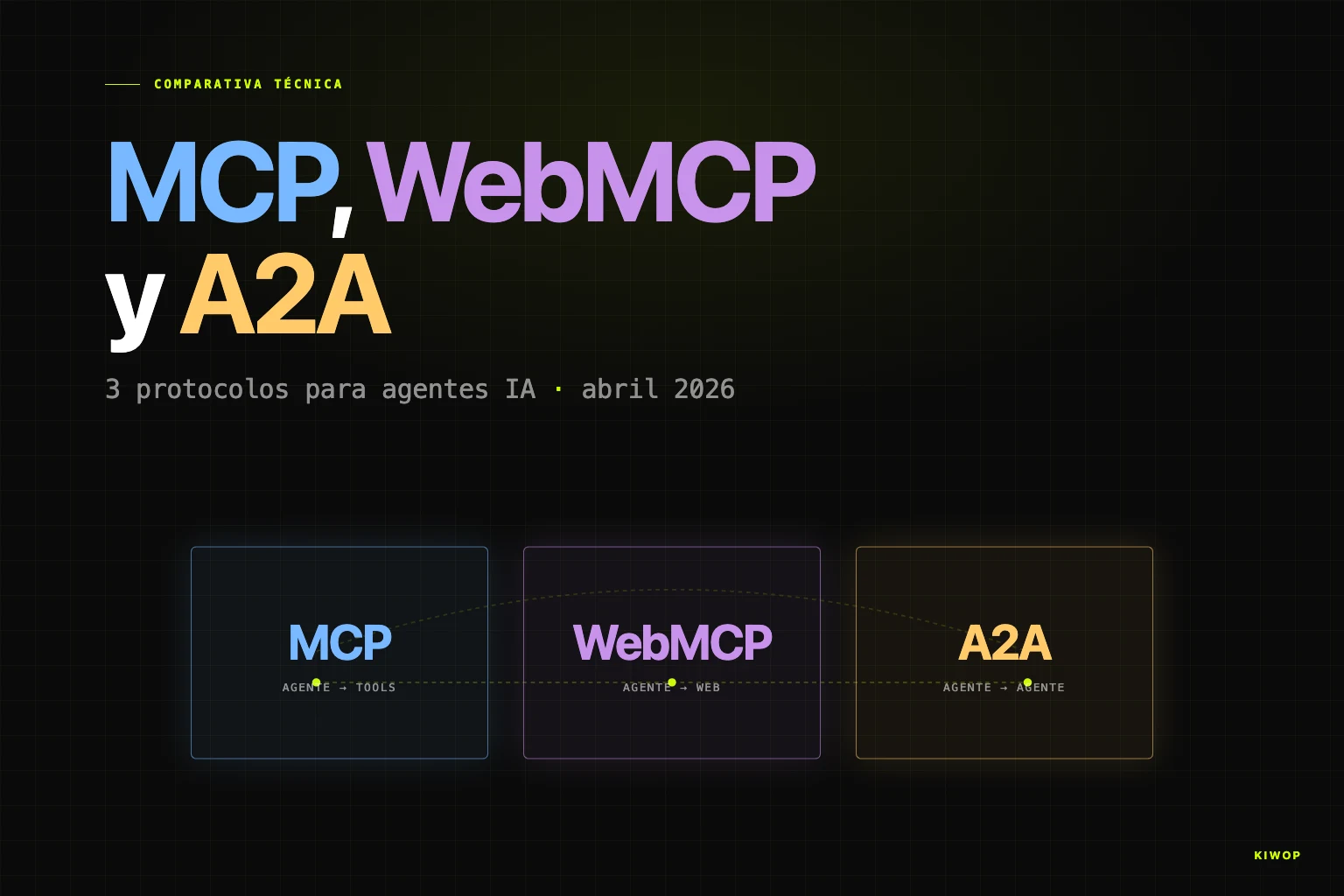
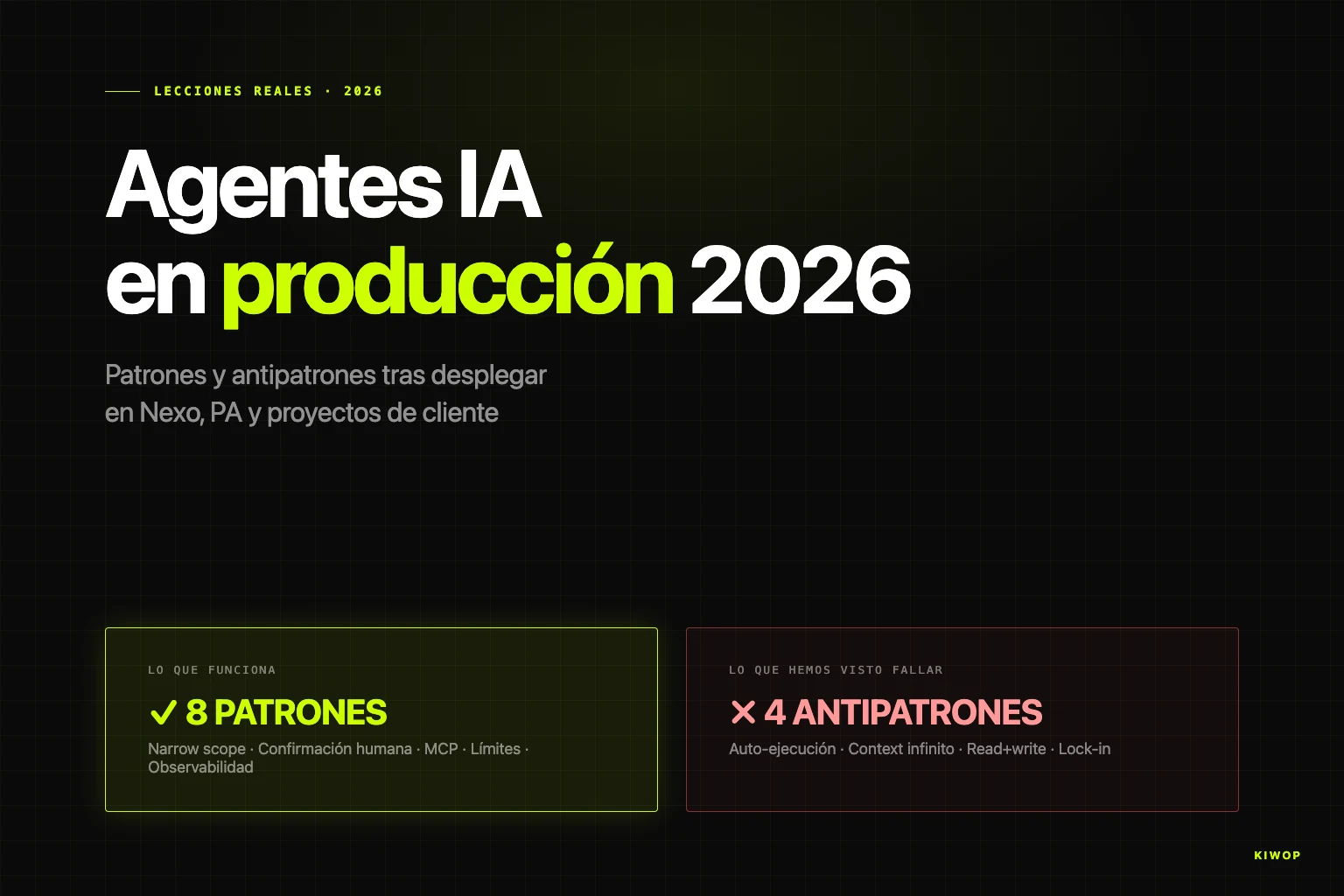
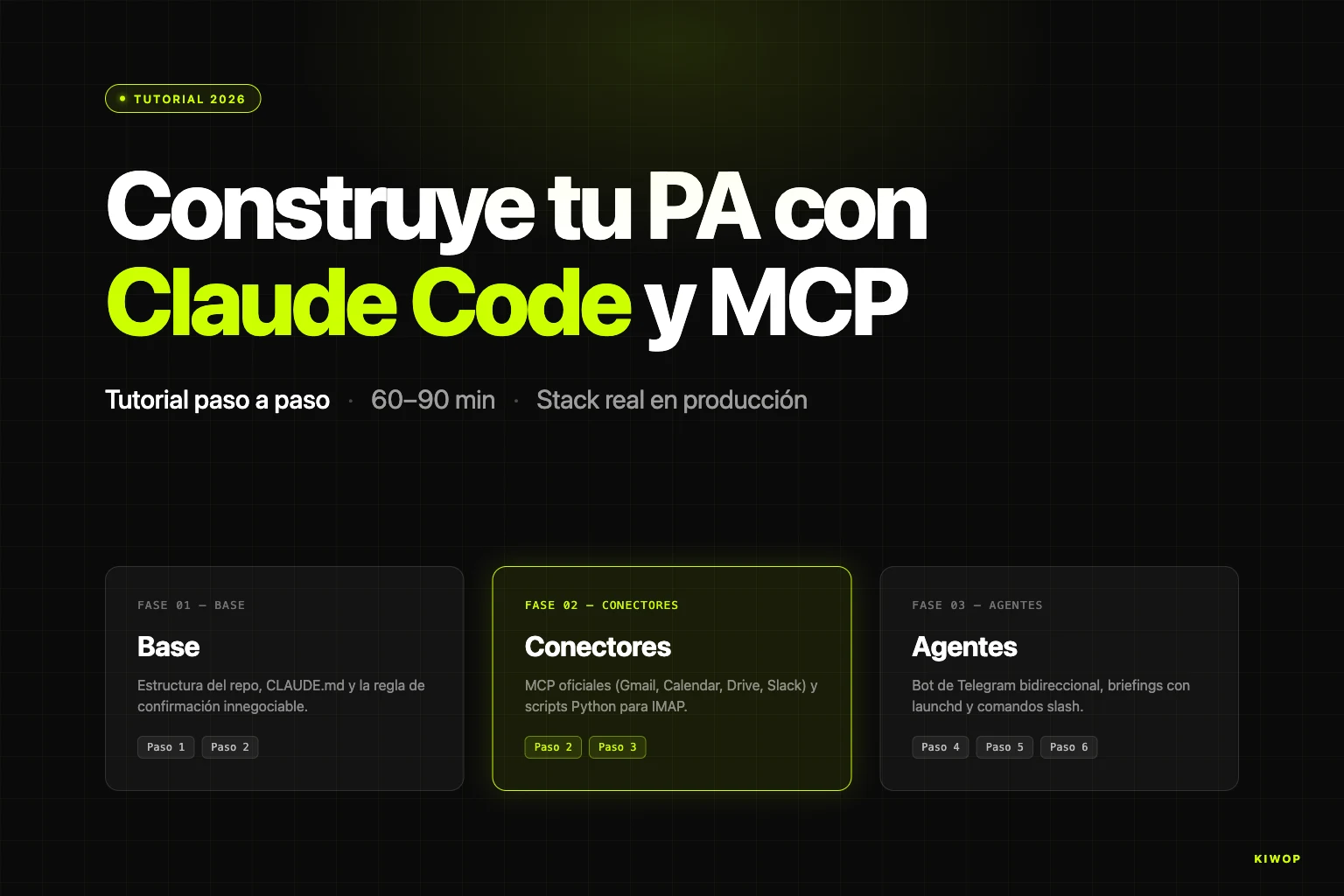
This article goes into technical detail. It's the documentation of the real state of the system as of April 2026 — decisions, trade-offs and things we'd do differently. It fits in the same cluster as our post on rebuilding a personal assistant with Claude Code and MCP, the guide to building your PA with Claude Code, patterns and antipatterns of AI agents in production and MCP, WebMCP and A2A protocols in 2026. If those posts deal with agents outside the app, Nexo is the demonstration of how you put agents inside an application that already has a rich domain, real data and serious tenancy.
What Nexo is and why we built it
Nexo was born from a recurring problem at B2B companies between ten and two hundred employees: daily operations live spread across half a dozen disconnected tools. Time tracking in one app, CRM in another, projects in ClickUp, billing in an ERP, payroll at the accountants', docs in Notion. Each tool works fine on its own, but nobody sees the operation as a whole, client data is duplicated across systems, and every report requires exporting CSVs from four places and cross-referencing them manually.
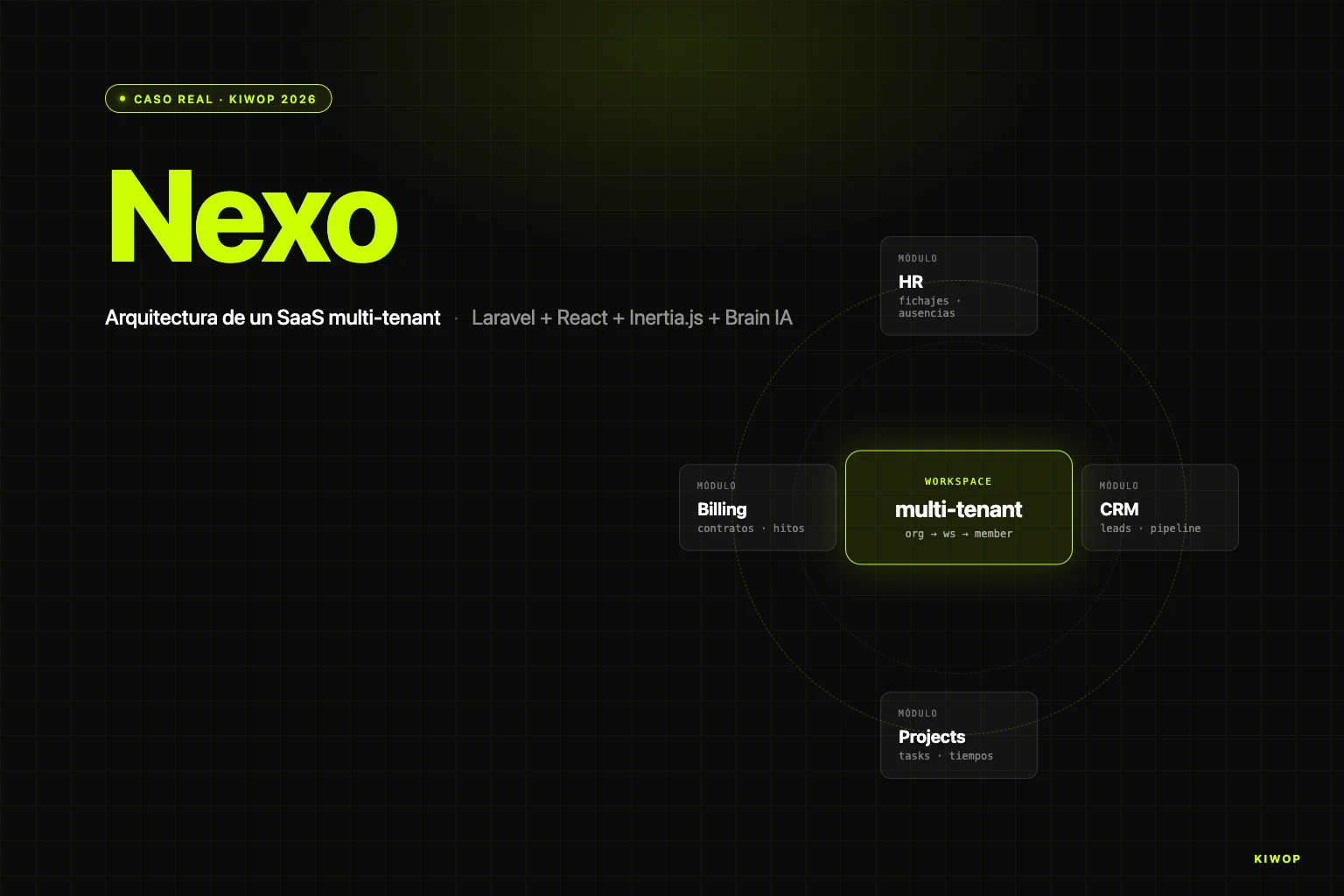
At Kiwop we suffered that problem. We built Nexo first for ourselves and then turned it into a product. Today it covers five modules:
- HR: time tracking (clock-ins with geolocation and four-year legal traceability), vacation and absence management, employee records, teams and holidays.
- CRM: companies, contacts, leads with pipeline, sales activities and outbound campaigns.
- Projects: projects, tasks with billable time, comments, attachments and time sessions.
- Billing: contracts, billing milestones, tender guarantees, bidirectional sync with Holded ERP.
- Payroll: payroll with Spanish legal calculation, support for several collective agreements (TIC, Comercio Catalunya), SILTRA export.
On top of all that live two pieces that set it apart from a classic operational SaaS: an AI contract extraction subsystem (you upload a contract PDF, AI fills in the record) and a custom AI agent engine called Brain, which lets you configure multi-step protocols so the platform executes autonomous work on workspace data.
Nexo runs in production at nexo.kiwop.com with dozens of active workspaces. They're not thousands: it's a B2B mid-market SaaS, not a consumer app. And it's shown on our website as a case study even though it's our own product, because the technical story is exactly the same as we'd tell if the client were external.
Why Laravel + Inertia.js + React (and not a pure SPA)
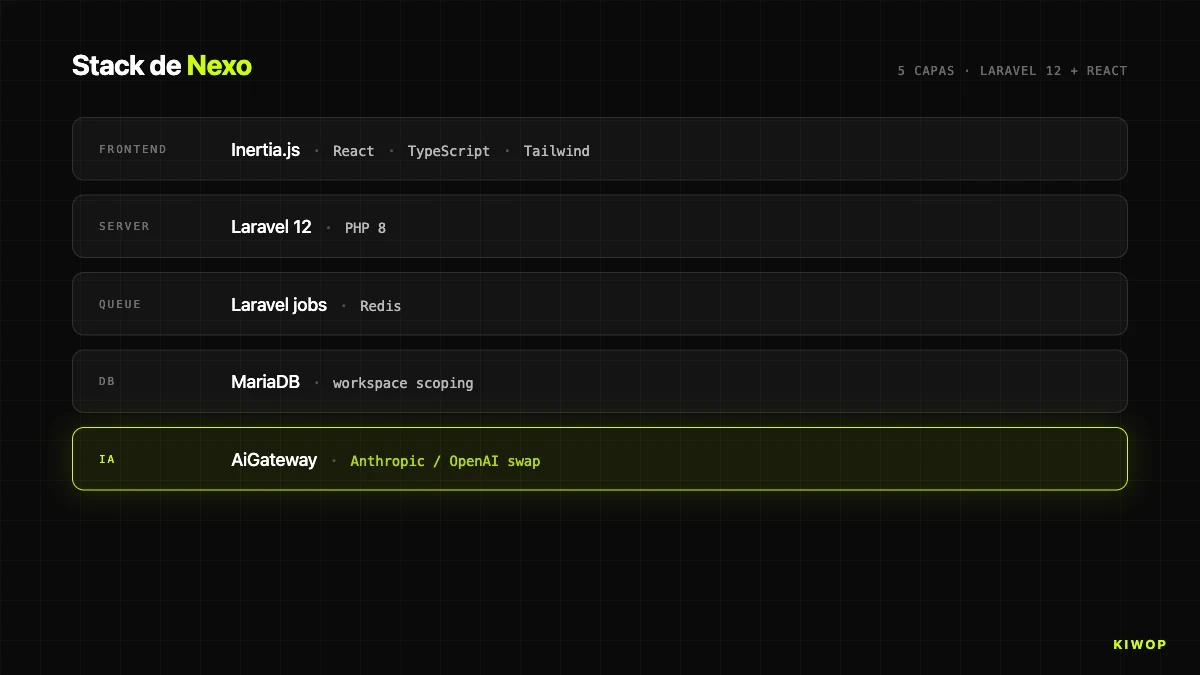
The first big decision was the frontend backbone. In 2025 the inertial consensus was "SPA in React/Vue consuming REST or GraphQL API". We went another way: Laravel 12 on the backend, React 18 + TypeScript on the frontend, and Inertia.js as the bridge. Not a separate SPA. A modern monolith with React views rendered from Laravel controllers.
When you split backend and frontend into two repositories connected by API, you gain one thing and lose five. You gain freedom to put another frontend tomorrow (a mobile app, another brand with the same API). You lose: unified authentication, shared validation, trivial SEO, atomic deploy, server-side session state, and the ability to iterate on a feature in a single commit. For an internal authenticated application like Nexo, those five things weigh much more than theoretical flexibility.
Inertia solves the fit. Laravel controllers, instead of Blade or JSON, return Inertia::render('PageName', $props). That renders a specific React component (resources/js/Pages/Workspace/Dashboard.tsx) with the props the backend already computed. Navigating is an internal fetch that swaps component and props without reloading: SPA UX, server-side truth, cookie authentication and time-tested Laravel middleware.
The HandleInertiaRequests middleware shares global props (user, workspace, role, flags) to all pages, so no component asks for that state on each page and we don't mount a Redux/Zustand for something the server already knows. Single deploy: git pull, composer install, npm run build, cache clearing, no windows of inconsistency between API and client.
The cost is that to open Nexo to external integrators we need a parallel formal API. We built it early: REST API `/api/v1` with Laravel Sanctum (tasks, projects, records, docs, leads, billing, webhooks), living alongside the Inertia routes. Own frontend via Inertia, integrators via REST with tokens.
The multi-tenant model: Organization → Workspace → Member
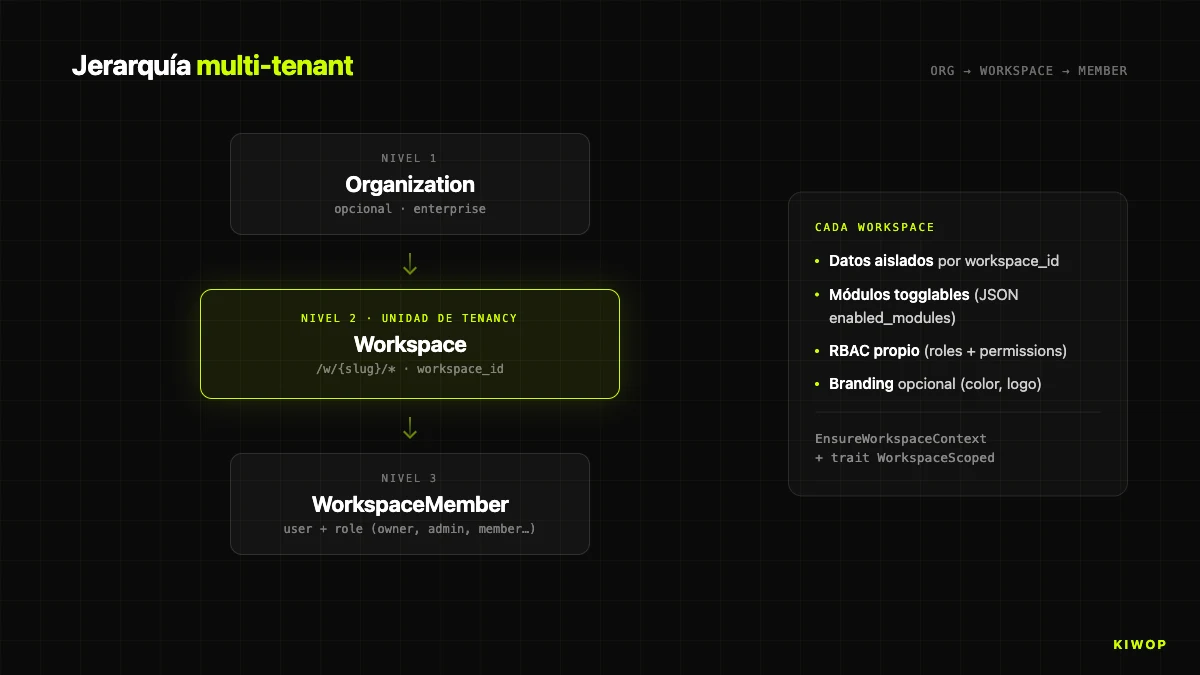
The second structural decision is how you do multi-tenancy. Two opposing schools: shared database with a tenant column versus schema per tenant. We chose the first, with a three-level hierarchy.
- Organization: optional grouping for enterprise accounts with several workspaces under the same brand.
- Workspace: the real tenancy unit. Own data, configuration, modules and visual identity. Identified by
slugin the URL:/w/kiwop/dashboard. - WorkspaceMember: pivot table connecting users and workspaces with a role (owner, admin, sales, operations, member, viewer).
We chose shared database with a workspace_id column for three pragmatic reasons: evolving the model without migrating N schemas, cross-product analytics without federating queries, and a single backup/restore operation. The cost is that a bug that omits a workspace_id filter can, theoretically, cross data between tenants. We mitigate it with two pieces.
The first is the `EnsureWorkspaceContext` middleware, which resolves the URL slug to the Workspace model, verifies user membership and, if the workspace belongs to an organization, also membership in it. Fails with 403 if anything doesn't add up. Runs on all routes under /w/{workspaceSlug}/*.
The second is the `WorkspaceScoped` trait applied to sensitive Eloquent models (BrainProtocol, BrainProtocolRun, etc.), so any query applies where workspace_id = ? by default. Disabling it requires being explicit, and that shows up in code review.
There's an operational detail we document as an absolute rule: workspace controllers must include string $workspaceSlug as the second parameter (after Request $request) before any other. Laravel injects parameters positionally, and omitting the slug makes the next parameter ($id) receive the slug and the request die in a silent 404 that is very hard to diagnose. The index route works, which means the bug only appears when you open the first detail.
The following table summarizes the core architectural decisions we took in Nexo, with the reason and the assumed trade-off. If you're designing a similar system, this table is probably the part of the article you'll want to copy-paste into an internal doc.
Module toggle system: enable/disable features per workspace
Each workspace enables or disables modules independently. The mechanism: a JSON column enabled_modules in the workspaces table mapping module to boolean. The list is closed and lives in code as the Workspace::MODULES constant (we don't let users create new modules at runtime). It includes the core blocks (dashboard always active, fichaje, registros, solicitudes), analytics (rentabilidad, informes), work (projects, tasks), sales (leads, outbound, licitaciones), finance (billing_contracts, billing, contabilidad), tools (booking, decision_requests, chat), knowledge (docs), settings (branding, notifications, settings), HR (employees, practicas, personal_documents, payroll) and more recent modules like chatbot, pulse_surveys, proactive_agents, capacity_planner, project_pulses and meetings.
Two points check the toggle: the isModuleEnabled('leads') method on the model, and above all the `EnsureModuleEnabled` middleware applied to route groups:
The middleware checks two things in order: (1) whether the module is enabled for the workspace, and (2) whether the user's role in that workspace can access the module. On any failure, it returns 404 (not 403, to avoid leaking the existence of the route). It's a small security through obscurity measure that, combined with the other layers, raises the bar for recon by an internal attacker.
Why we don't use classic feature flags (LaunchDarkly, Unleash, Flagsmith): our toggles aren't A/B experiments or gradual rollouts, they're per-tenant product configuration. A client without the Payroll module isn't going to have it until they contract it. Pulling in an external SaaS to manage that would be gratuitous complexity.
The branding module deserves a separate mention: when active, the workspace can customize its primary color (CSS variable --workspace-primary), upload a logo and adapt the visual identity. Useful for white-label or enterprise clients who want the internal brand. The base CSS is preserved, only the accent changes.
RBAC: roles + permissions without external libraries
For authorization, Nexo doesn't use Spatie Laravel-permission or any other library. We have our own RBAC system: roles, permissions and role_permissions tables, with fixed roles (owner, admin, comercial, operations, member, viewer) and granular permissions defined in RbacSeeder. Three reasons not to use a library.
First, the permissions domain is coupled to our own concepts: workspace, organization, modules, actions on entities. It's not "user can do X", but "this user, in this workspace, with this role, can do X on Y". With a generic library we'd have ended up rewriting half the layers on top.
Second, Laravel's Gate already resolves authorization. We define gates in AuthServiceProvider pointing to policies (DocumentationPolicy::viewCategory) and use Gate::allows(...) or @can(...) in the views. The only thing we add is the resolution of the workspace role: $workspace->getUserRole($user) and $workspace->canRoleAccessModule($role, 'leads'), cached in $request->attributes during the request lifecycle.
Third, we have a simulation mechanism ("view the app as another user", useful in support) that interacts with RBAC in a specific way: when the admin simulates, the usual "admin can do everything" bypass is intentionally disabled, and you see the app as the simulated user sees it. That lives in EnsureModuleEnabled with $request->attributes->get('is_simulating', false). On top of an external library it would have been fragile.
Legacy coexistence: old Blade + new Inertia in parallel
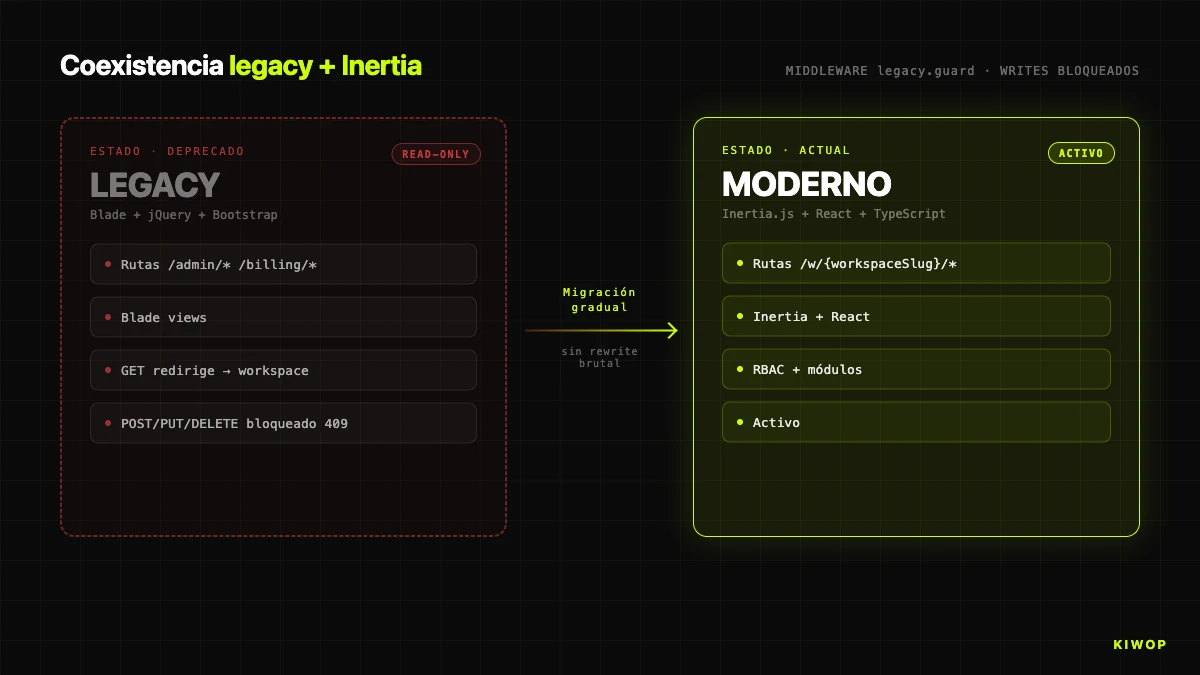
Nexo has a prior history. The original version of the application was built on Laravel 10 with Blade + jQuery + Bootstrap. The Inertia/React frontend came later. The migration wasn't a big-bang: there's still live Blade code in production. That coexistence is the reality of any real application that has been in production for several years.
The question is how you prevent that coexistence from becoming a problem. Our answer is the `LegacyRouteGuard` middleware, registered as legacy.guard, applied to all old routes. It does three things:
- Logs any access to legacy routes in
storage/logs/legacy-routes-*.log. Real telemetry of which old routes are still alive, guides prioritization. - Blocks POST/PUT/PATCH/DELETE with 409 Conflict and the message "Legacy interface is read-only". No data change goes via the old path.
- Redirects GETs to the new equivalent when there's a defined mapping. The
redirectMapassociates legacy route with workspace route ('admin.horarios' => 'workspace.registros.index', etc.) and resolves parameters (workspaceSlug,articleId,contract) on the fly.
The key rule is "GETs open, writes closed". If you block everything, you break bookmarks and old links in emails. If you allow writes, you have two paths to modify the same data and you can't guarantee that the new path's validations, events and audit logs fire. The "read via the old path, write only via the new one" combination lets you not break bookmarks while migrating views one by one without fear.
There's one exception: admin simulation routes (/admin/simulate-employee, /admin/stop-simulation, /admin/toggle-view-mode) don't carry the guard, because they're legitimate support doors. The rest do.
It's a replicable pattern: if you have a 2019 Laravel app with Blade and want to migrate to Inertia without stopping the business for six months, add a guardian middleware, block writes, log accesses, map redirects, and attack the migration by real access frequency (not alphabetical order or aesthetic taste).
Brain — Nexo's AI agent system
Here comes the piece most proprietary to Nexo: Brain, a multi-step AI agent engine that lives inside the application. It's not a LangChain wrapper or a generic framework. It's an engine designed to execute automations on a workspace's data, with explicit limits and full traceability.
The domain has two models: `BrainProtocol` (definition: name, description, steps, configuration) and `BrainProtocolRun` (execution: context, step-by-step results, status, tokens). Both live under workspace_id with the WorkspaceScoped trait, so they never cross between tenants.
The `BrainProtocolEngine` engine processes steps sequentially with a mutable in-memory context. Each step reads from the context, runs its logic and writes under an output_key that subsequent steps can read. It applies two hard limits written in stone:
A protocol with more than ten steps is truncated at execution. If the accumulated context exceeds 300,000 characters, we log a warning and before calling the model we truncate it with a [CONTEXT TRUNCATED BY SIZE LIMIT] marker. Those two limits are the barrier against an agent's most real risk: the combinatorial explosion of context and cost when it iterates over its own outputs.
Brain supports six step types:
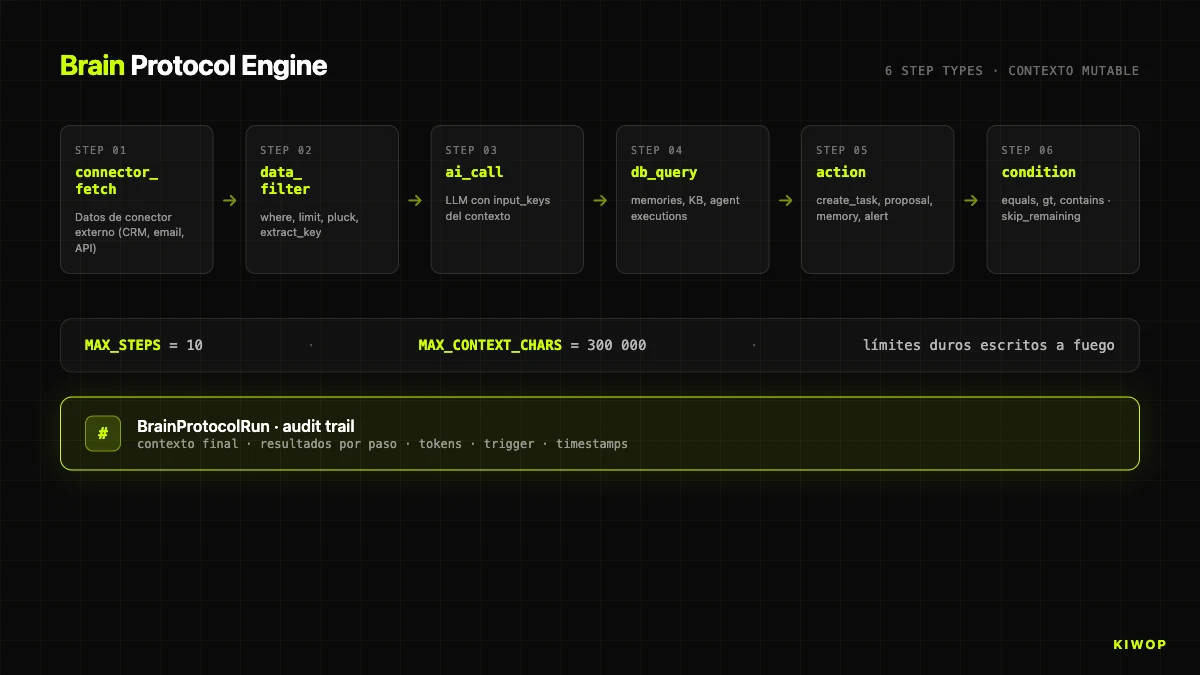
The ai_call step does the most work. It reads the keys marked as input_keys, serializes them to JSON under ### key headers and adds them to a ## AVAILABLE DATA section concatenated to the prompt. That makes the prompt-context contract explicit, prevents the model from inventing data outside the section, and eases debugging: the exact context is in the audit trail.
The action step is what makes Brain "an agent" and not a pipeline. Supported types: create_task, create_proposal, save_memory, alert. Each resolves parameters with {{key.subkey}} templates against the context: a task title can be {{ai_summary.content}} and the engine substitutes it before executing. It connects the model's reasoning with the real action on the domain.
The condition step is the firewall. With skip_remaining_if_false: true, if the condition isn't met, the rest of the protocol is skipped and the steps are marked as skipped_remaining. Enables protocols of the type "if there's nothing to do, don't spend tokens".
Example: leads onboarding protocol. (1) connector_fetch of new leads in the last 24h. (2) condition that aborts if the list is empty. (3) data_filter that keeps leads with score > 60, limit 20. (4) ai_call that generates a first email draft. (5) action of type create_proposal that leaves the proposal in the salesperson's inbox — not a sent email, because actions with external effect go through human approval.
Everything is logged in BrainProtocolRun: final context, per-step results with duration and status, tokens, user, trigger source (manual, schedule, connector_update, agent_alert) and timestamps. That audit trail is the table through which a compliance officer can audit what AI did on the client's data. Without it, a SaaS with agents isn't auditable; with it, it is at the finest grain. Brain is our internal materialization of many of the patterns we document in AI agents in production: patterns and antipatterns for 2026.
AI contract extraction + anti-hallucination
The other important AI piece in Nexo predates Brain and solves a specific case: creating a billing contract from its PDF. The manual work of copying client name, amount, dates, e-Fact data, guarantees and milestones is sticky and error-prone.
The `AiContractExtraction` subsystem solves that flow. An endpoint POST /billing/contracts/ai-extract receives the PDF (max 10MB), runs it through PdfTextExtractor (based on smalot/pdfparser), and hands it to the extractor chosen by AiExtractorFactory. The factory picks between OpenAiContractExtractor (GPT-4o in its most recent stable version, configurable via OPENAI_MODEL) or its Anthropic equivalent based on AI_PROVIDER. The ContractExtractorInterface guarantees that switching provider is a flag.
The prompt is optimized for Spanish-language contracts, with explicit anti-hallucination rules. The response is structured JSON where each field is an object with value, confidence (0–1) and evidence (literal quote from the PDF text). That changes the UX radically: the form auto-fills only when confidence >= 0.5, filled fields appear with a light-blue border and a tooltip "Filled by AI (confidence: 85%)", and a "what did the AI find?" accordion shows the literal evidence. The human never blindly trusts: reviews, adjusts and saves.
The anti-hallucination rules in the system prompt are the core of why this works. If the AI doesn't find a field, the value must be null and confidence must be 0. If it infers a value by context (assume 21% VAT when it isn't broken out), it must lower the confidence and add an entry to warnings. Warnings are shown before saving: "No VAT broken out found, assuming 21%", "End date not clearly specified". The combination of confidence + evidence + warnings + mandatory human review is what makes an LLM extraction operable in an environment where an error leads you to issue a wrong invoice.
Everything is kept in the ai_contract_extractions table: who uploaded, when, what file (with SHA256 hash; we don't store the full text, it's important for privacy), which provider, which model, tokens, estimated cost, result JSON, warnings, status. If five months later someone asks "how did this data get into the contract?", the answer is in the database.
The general engine behind — the one that allows swap between OpenAI and Anthropic with a flag, that manages budget limits (AiBudgetGuard), that resolves which connection to use per workspace (AiConnectionResolver) — is the `AiGateway`, the same one used by the ai_call of Brain. Centralizing the exit to LLMs gives three things: a single point for rate limits and budgets, a single point to log tokens per feature (chat, agent, extraction), and a single point to switch provider without touching business code. If tomorrow we test a Sonnet 5 or a GPT-6, the change lives in a single line.
We also apply this abstraction in client projects under LLM integration and AI agent development. Centralizing the exit door to the model is one of the first pieces of advice we give anyone integrating AI into a production product.
Integration with Holded ERP (bidirectional)
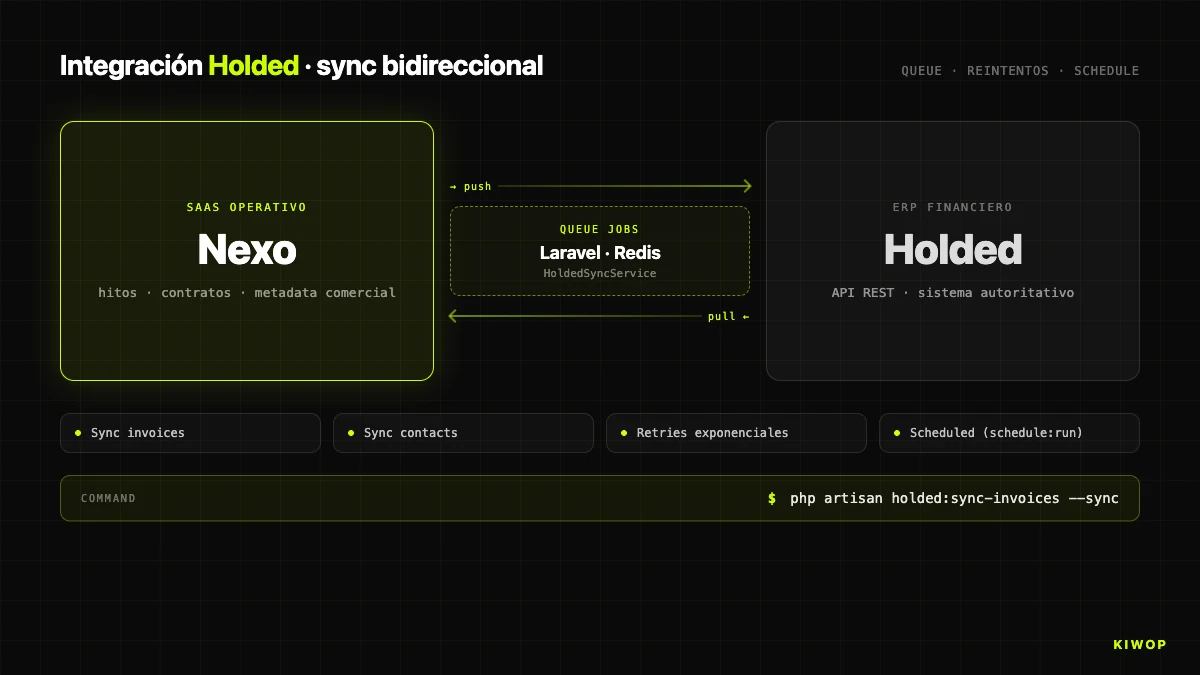
Nexo doesn't replace the billing ERP. It replaces the management panel looking at the ERP. For real billing we still use Holded and sync bidirectionally with it. The integration lives under app/Services/Holded/ with four pieces: HoldedClient (HTTP client), HoldedSyncService (orchestrator), HoldedStatusMapper (status mapping) and SyncResult / BatchSyncResult (typed results).
Sync follows the classic pattern of external ERP integration: queue jobs with retries, scheduled sync every 15 minutes, and an Artisan command holded:sync-invoices --sync to force a manual round. The bidirectional direction means two flows: from Nexo to Holded when a milestone is marked as "issued" (the invoice is created) or "paid" manually, and from Holded to Nexo when a client pays an invoice in the ERP and the status change comes back on the next round.
Conflict management is where these integrations get dirty. Our rule: "Holded wins on financial states, Nexo wins on commercial metadata". Payment status is decided by Holded (the official financial system). Internal labels, notes and project links are decided by Nexo. That split reduces conflicts to a manageable subset where one of the two parties is always authoritative.
HOLDED_ENABLED enables or disables the integration per environment. Configuration is done at the workspace level, not globally — each workspace can point to its own Holded instance with its own key.
Observability and production operation
If you can't operate it, you don't have it. Nexo runs in production at nexo.kiwop.com with a simple stack: PHP 8.4 FPM with a dedicated pool, MySQL/MariaDB 10.4, Node 20 via nvm for frontend build, and nginx in front. In development, DDEV with a replica of the stack on Docker. Bounded dev/prod parity (local PHP 8.2 vs 8.4 production).
Daily observability rests on three sources. storage/logs/laravel.log is the main log (errors, exceptions, warnings from Brain's engine when context grows too large). storage/logs/legacy-routes-*.log is the dedicated log of legacy route accesses, rotated by day: if a route doesn't appear in two weeks, it's a candidate for deletion. And BrainProtocolRun is the structured audit trail of each agent run, queryable via SQL.
The deploy follows ./scripts/deploy.sh: artisan down, DB backup, git pull, composer install --no-dev, frontend build if deps changed, artisan migrate --force, caches, artisan up. Rollback: restore the last mysqldump and git checkout <sha>. Low deploy ratio, human review per deploy.
An interesting operational piece is the Claude CLI relay (claude-relay.service). Some workspaces use AI connection via CLI authentication (OpenClaw-style) instead of API key, to consume a dedicated Claude Max subscription. The relay is a PHP daemon under systemd as user proves (never root) that translates internal HTTP requests to claude -p CLI calls. A pattern to decouple AI cost from actual platform usage.
Scaling and lessons learned
It's worth stopping to tell what has hurt, what we'd do differently, and what we'd add if we started today.
What hurts today. Workspace controllers require remembering the (Request $request, string $workspaceSlug, ...) signature. Human error committed enough times. In hindsight, we'd have solved it with dependency injection of the CurrentWorkspace DTO instead of reading the slug from the route parameter — EnsureWorkspaceContext already logs it, we just don't use it consistently as the single door. Migrating controllers to that pattern is pending work.
Blade + Inertia coexistence has lasted longer than planned. The initial plan was to migrate the whole app in six months. Today, with the guardian middleware blocking writes for over a year, there are still read-only Blade views that nobody has prioritized migrating. It's not a security problem but it is a maintenance (two stacks in parallel) and UX consistency one. Lesson: incremental migration with a guardian works, but it needs an explicit calendar and an owner; without a clear owner, the migration drags.
What we wouldn't add. We've resisted putting an external agent framework (LangChain, CrewAI, Haystack) for Brain. Brain does exactly what we need and a generic framework would have multiplied the surface without adding functional capability. For an agent that lives inside a Laravel app with its own domain, a custom engine of a few well-understood lines weighs less than a thousands-of-lines framework you don't control.
What we would add. We're starting to think about WebMCP as an external protocol to expose Brain to third-party agents (Claude Code, Cursor, a client's PA). If Brain already executes autonomous work on the workspace with full audit trail, exposing it as an MCP server would allow an external agent to execute Nexo protocols as native tools. It's the pattern we analyze in the article on MCP, WebMCP and A2A. Work for the coming months.
What we haven't published. We don't give concrete figures on active workspaces, users, monthly tokens or protocol runs per day. Not out of secrecy: any number gets stale in three months and we prefer not to publish metrics that become "incorrect historical data". If it applies to a technical evaluation prior to a project, ask us directly.
Scale. Nexo isn't a mass SaaS: dozens of B2B mid-market workspaces, each with dozens to low hundreds of users. The architecture comfortably supports an order of magnitude more without a redesign; the real bottleneck — at the order of thousands of workspaces — would be the Holded sync (due to the external API rate limit, not Nexo) and the cache layer.
Frequently asked questions
Why Inertia.js instead of a separate SPA with REST API?
Because Nexo is an internal authenticated application, not a mass public product. Inertia provides SPA UX with atomic deploy, unified auth, shared validation and server-side session. A separate SPA only makes sense when you need multiple frontends on the same API or when frontend and backend live in different infrastructure, neither of which applies. We maintain at the same time a REST API /api/v1 for external integrators.
Is sharing a database with a `workspace_id` column safe compared to schema per tenant?
It's safe if you apply discipline: middleware that resolves the workspace on every request, the WorkspaceScoped trait that applies the filter by default, and code review that blocks scope disables. The cost of schema per tenant (migrations N times, backups per tenant, federated analytics) didn't pay off. For very high loads or specific regulatory requirements (healthcare) the math changes.
What does a `BrainProtocol` do and how is it configured?
A protocol is a sequence of up to 10 typed steps (connector_fetch, data_filter, ai_call, db_query, action, condition) that the engine runs sequentially sharing a mutable context. It's configured from the workspace panel by choosing the trigger (connector, schedule or manual), defining the steps in order and marking which are critical. Each run generates a BrainProtocolRun with a full audit trail.
How much does Brain cost in tokens per month?
Depends on use and model. The limits MAX_STEPS = 10 and MAX_CONTEXT_CHARS = 300000 are the hard firewalls, and each ai_call includes its own max_tokens (default 2000). For the current usage profile, the cost is a minor line of operational expenses and is monitored per feature (chat, agent, extraction) through the AiGateway.
How do you handle the Holded integration if Holded goes down?
Sync jobs are in a queue with retries. If Holded is down, sync degrades without breaking Nexo: milestones can still be created and modified, creation in Holded stays queued and is retried when the API responds. The visible status is "pending sync". We don't block workspace operation due to an ERP outage.
Why have you kept old Blade for over a year?
Because a big-bang rewrite of a production app with real data is an antipattern with horror stories. The legacy.guard middleware blocks writes from day one, eliminating the risk of inconsistency. Migrating read-only views is work without a critical deadline, guided by real usage logs. The alternative — stopping features for six months — would have been far worse commercially.
What happens if a developer forgets `string $workspaceSlug` in a workspace controller?
The request reaches the controller but Laravel injects the slug into the next parameter ($id), the lookup fails and the request returns 404. Symptom: a silent 404 very hard to diagnose. The index route works, so the bug only appears when opening the first detail. It's documented as an absolute rule and it's the first thing we explain to any new developer.
Can Brain be exposed as an MCP server so an external agent can use it?
Not today, it's on the roadmap. The technical piece exists (engine, audit trail, per-workspace limits) and the natural step is wrapping it in an MCP server that respects RBAC and module toggles. It opens Nexo to ecosystems of external agents without opening the database. If you're interested in the use case for your own SaaS, it's part of AI agent development and AI consulting.
Conclusion: building a SaaS in 2026 isn't choosing fashion, it's choosing discipline
The honest conclusion of turning Nexo from a Laravel 10 app with Blade into a complete operational platform with Laravel 12, Inertia + React and AI agents is that technical architecture weighs much less than people think when picking the stack, and much more than people think when maintaining it. Nothing we've described here is exotic: Laravel has been mature for a decade, Inertia is a simple piece, multi-tenancy with a workspace_id column is the PHP ecosystem's default pattern, RBAC with roles + permissions + role_permissions tables is in any database design course. The difference between a SaaS that scales and one that gets stuck isn't in the framework's name — it's in the discipline with which you apply the middleware that blocks cross-access, in the explicit limits you write in stone when you put AI into the flow, and in your ability to live with legacy code without turning it into a time bomb.
Nexo is the product that best illustrates how we work. If your company is considering building a multi-tenant SaaS, if you need to introduce AI agents in an auditable way into an application that's been in production for years, or if you're evaluating Nexo directly as an operational platform, let's talk. We are Kiwop, Digital agency specialized in Software Development and Applied Artificial Intelligence for global clients in Europe and the US, and we offer custom AI agent development, artificial intelligence consulting, LLM integration and enterprise RAG for production contexts. You can see the public Nexo case study or write to us directly.