UX Design Agency for Websites, Online Stores and Apps
We research how people actually use your product, structure the information, prototype and test before anyone writes code, and hand over a design system your team can keep using. Accessible to WCAG 2.2 AA from the first sketch, and built by the same team that designed it.
- 2-3 clicks To buy tickets on the TNC site
- WCAG 2.2 AA Accessibility designed in
- Since 2009 Design and development, one team
- 01 · Research Brand, audience and competitors
- 02 · Concept One idea that organises
- 03 · System Type, colour and components
- 04 · Prototype Clickable and tested
- 05 · Testing With real users
- 06 · Handover Your team uses it from day one
- Every test refines the system
Definition
What Is UX/UI Design?
UX/UI design is the work of defining how a digital product works (UX, user experience) and how each screen looks and behaves (UI, user interface). UX decides flows, structure and content based on what people need; UI turns them into components, typography, colour and states that make sense at first sight.
Summary
Executive Summary
What you buy when you hire UX/UI design, and what it saves you.
The cost of a poor experience never shows up on an invoice: it sits in abandoned carts, forms nobody finishes, support calls to do something that should be obvious, and weeks of development thrown away when a screen is redesigned after it was built. UX/UI design moves those decisions to the start, when changing them costs a prototype rather than a sprint.
We work from research and real data (interviews, analytics, heatmaps, user tests), not opinions. That gives us the structure, then prototypes we test and, finally, a design system with components, states and rules so your product can grow without losing consistency. WCAG 2.2 AA accessibility goes in from the first sketch: contrast, focus, touch targets and reading order are designed, not patched.
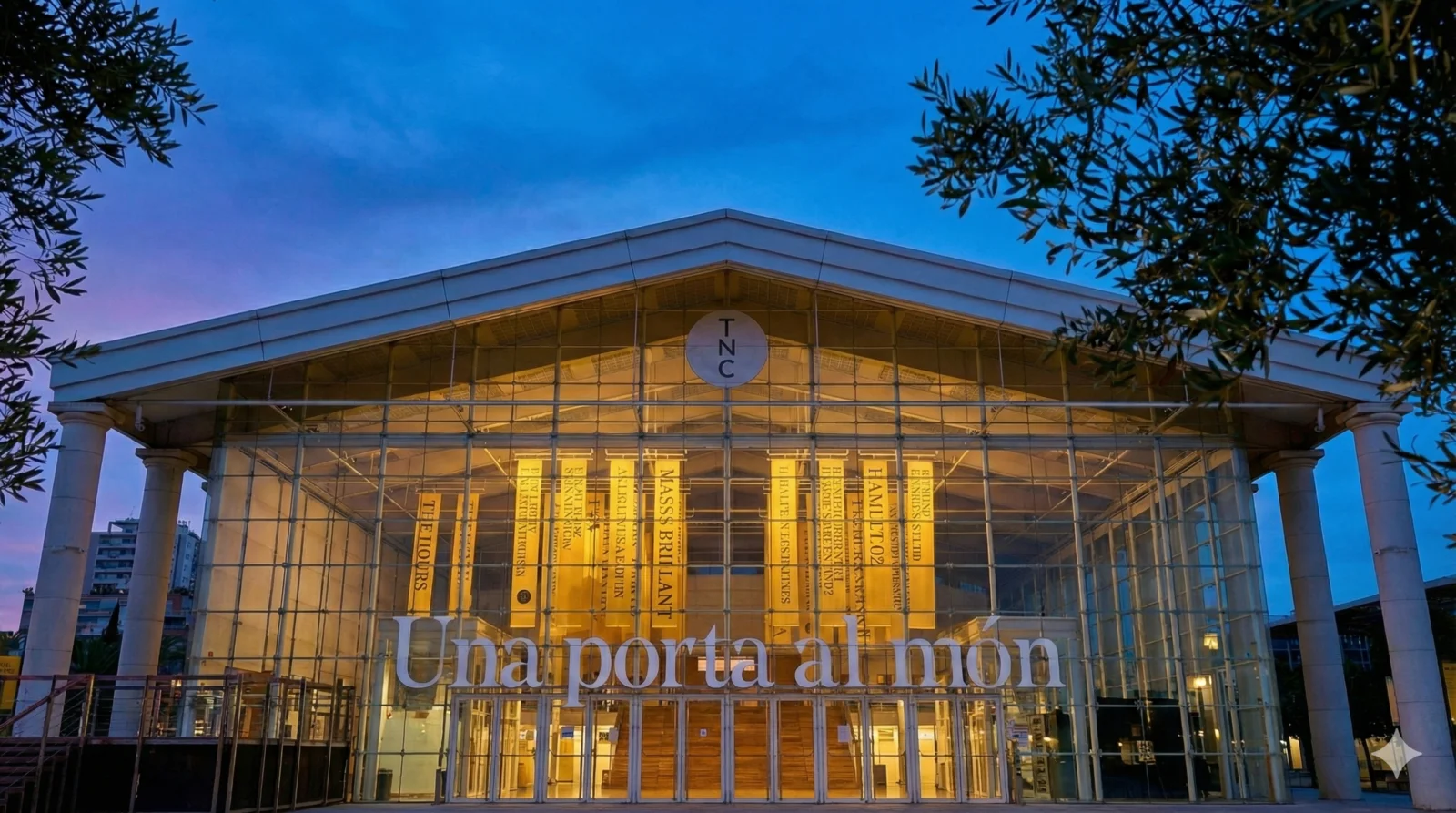
What sets us apart is that design and development are the same team. The design we sign off is the one that gets built, and the person who designed it checks that it is respected. That is how we worked for the Teatre Nacional de Catalunya, where the UX redesign brought ticket purchase down to 2-3 clicks and cut mobile LCP by 37%.
- -37% Mobile LCP after the TNC redesign
- +35% Direct bookings at Tamarit Beach Resort
- +200% Online donations at Ampans
What's included
What UX/UI Design Includes
Every phase leaves a deliverable you can use, even if someone else does the build.
- User research: interviews, analytics and heatmap review, and a look at competitors
- Information architecture: content map, navigation, taxonomies and flows for the key tasks
- Wireframes and clickable prototypes in Figma to validate flows before investing in visuals
- Usability testing with real people on the prototype, with prioritised findings
- Interface design built on your brand: typography, colour, icons, states and micro-interactions
- Design system: components, tokens and usage rules so your team can create consistent new screens
- WCAG 2.2 AA accessibility by design: contrast, visible focus, touch targets and reading order
- Responsive, mobile-first design: every screen thought through for mobile, tablet and desktop
- Support during development: specs, review of what gets built and data-driven tweaks after launch
Why
UX/UI Design, Web Design and Branding: What Each One Is
Three services that overlap, with different goals.
Branding defines who you are: brand strategy, logo, visual identity and tone of voice. Web design is the project of a corporate website that carries that brand and turns visits into enquiries. UX/UI design goes one level deeper: how a product works for real tasks, such as buying, booking, signing up, managing an account or working in a platform every day. You need it when the problem is not the look, but that people cannot get done what they came to do. If what is failing is the conversion rate of a site that already works, start with CRO.
- With states Components
- WCAG 2.2 AA Accessibility
- Tested Prototype
Key points
What We Design
Products where the experience decides whether they get used.
- 01
Websites with Complex Tasks
Event listings, search, private areas, bookings or ticket sales. For the TNC we redesigned the programme navigation with filters and the show pages with a clear hierarchy (dates, cast, prices and buy button).
- 02
Online Stores and Booking Flows
Product pages, collections, cart and checkout. At Tamarit Beach Resort the mobile UX takes guests through a 3-step booking, with a gallery and an accommodation comparison tool.
- 03
Mobile Apps
Flows, navigation and components for iOS and Android, following each platform’s conventions, with touch targets and states designed for thumbs. We build them through our mobile app development service.
- 04
Digital Products and SaaS
Dashboards, long forms, permissions and heavy daily use. We do it in-house: Nexo, our own CRM, projects, invoicing and time-tracking platform, is designed by us and used by us every day.
- 05
Design Systems
Component library, tokens and documentation so several teams or suppliers can design and build with the same pieces, without reinventing every screen.
- 06
UX and Accessibility Audits
Heuristic review, data analysis and user testing on what you already have, with a prioritised list of changes. If you need to meet legal requirements, our web accessibility service steps in.
How we work
How We Run a UX/UI Project
From what we know about your users to a tested design that is ready to build.
- 01
Discovery and Research
Interviews with your team and with users, plus a review of analytics, heatmaps and support requests. Out come the goals, the key tasks and the problems to solve.
- 02
Architecture and Flows
Content map, navigation and the flow of each key task. We decide what goes on each screen, and in what order, before drawing it.
- 03
Prototype and Testing
Wireframes and a clickable prototype that we test with real people. Whatever is unclear gets changed here, while it is cheap.
- 04
Interface Design and Design System
Visual design built on your brand, with every component state and the WCAG 2.2 AA accessibility rules documented.
- 05
Build and Measure
We support development (ours or yours), check that what gets built matches the design and use data to measure what works after launch.
Who it is for
Is It for You?
UX/UI design pays off when people have tasks to complete and there is data to tell whether they manage.
Who it's for
- Companies with a website or store where people get lost, drop off or call in to do something that should be simple.
- Teams about to build an app or a SaaS product who want to validate the flows before writing code.
- Products that have grown patch by patch and need a design system to become consistent again.
- Organisations that must meet accessibility requirements (WCAG 2.2 AA, European Accessibility Act) and prefer to design for it from the start.
- In-house product or development teams that need designers with technical judgement.
Who it's not for
- If you only need a simple corporate website that conveys your brand: what you need is web design.
- If what is missing is the brand identity itself (logo, colours, tone): start with branding.
- If you want good-looking screens with no time for research or user testing: we would not be selling you what we actually do.
Deliverables
What Is Included and What Is Not
What you get at the end of a UX/UI design project.
Included
- Research report with the key tasks, the problems found and their priority
- Information architecture and flows for the key tasks
- Clickable Figma prototype and usability test results
- Design of every agreed screen for mobile, tablet and desktop
- Design system: components with their states, tokens and accessibility rules
- Editable design files and ownership of everything delivered
Not included
- Development and coding (quoted separately, with our team or yours)
- Creating a brand and visual identity from scratch (that is a branding project)
The proof
Design Measured in Results
For the Teatre Nacional de Catalunya we carried out a task-centred UX redesign: buying tickets now takes 2-3 clicks, mobile LCP fell by 37% (from 3.8 to 2.4 s), pages per session rose by 18% and the site meets WCAG AA. At Tamarit Beach Resort we designed a 3-step mobile booking flow on top of its own booking engine, and direct bookings grew by 35%. At Fundació Ampans inclusive design to WCAG 2.1 AA went hand in hand with a 200% increase in online donations. And at TwoPoles the redesign of product pages and collections, measured through CRO, took conversion from 2.1% to 2.5%.
- 2-3 Clicks to buy tickets (TNC)
- 3 Steps in the mobile booking flow (Tamarit)
- +35% Direct bookings (Tamarit)
- 5.0 Clutch rating
For the CTO
Summary for the CTO
How design fits with engineering.
We design in components with every state (default, focus, error, empty, loading, disabled) and with colour, typography and spacing tokens that carry straight into code. That way the design system and the component library speak the same language, and a brand change does not mean reviewing every screen one by one.
Accessibility is specified in the design: 4.5:1 contrast for text and 3:1 for controls and focus, minimum touch target, focus order and the semantics of each component. It is then measured with axe-core and screen readers, not by eye. Performance is designed too: image weight, fonts and animations that do not compromise Core Web Vitals, as on the TNC site.
Technologies
- Figma
- Design tokens
- Tailwind CSS
- axe-core
- Lighthouse
- VoiceOver
- TalkBack
- GA4
- Hotjar
- Microsoft Clarity
- Components with every state, not just the happy path
- Design tokens that carry into code without reinterpretation
- WCAG 2.2 AA accessibility specified and measured with axe-core
- Performance considered from the design stage (images, fonts, animation)
- Design review of what has been built before launch
Risks and how we cover them
The Risks We Avoid
What usually goes wrong in a design project.
- 01
Designing around the opinion of whoever is most senior in the room
MitigationEvery major decision rests on research, usage data or user testing, and is documented.
- 02
A beautiful design that cannot be built, or gets built differently
MitigationDesign and development are the same team: the design is checked with technical judgement and we review the build before launch.
- 03
Accessibility bolted on at the end with patches
MitigationContrast, focus, touch targets and reading order are defined in the design system and measured with axe-core.
- 04
A product that loses consistency with every new screen
MitigationA design system with components, tokens and usage rules that your team can keep using without us.
Technologies
Tools
What we use to research, design and measure.
- Figma
- Maze
- Hotjar
- Microsoft Clarity
- GA4
- Looker Studio
- axe-core
- Lighthouse
- VoiceOver
- TalkBack
- NVDA
- WCAG 2.2
- Tailwind CSS
- Design tokens
FAQ
UX/UI Design FAQs
What people ask us most before getting started.
What is the difference between UX and UI?
UX (user experience) decides how the product works: which tasks it solves, in what order, with what structure and content. UI (user interface) decides how each screen looks and behaves: components, typography, colour, states. Good UI on top of poor UX is still hard to use, which is why we work on both together.
What does a UX design agency do?
It researches how people use your product, structures the information, designs and tests prototypes, creates the interface and a design system, and supports development so that what gets built matches what was designed. In our case, the same team can also build it.
How is it different from web design?
Web design is the project of a corporate website that conveys your brand and generates enquiries. UX/UI design focuses on products with tasks: stores, bookings, private areas, apps or SaaS platforms, with research and user testing. Many web design projects include UX; what changes is the depth.
How much does a UX/UI design project cost?
It depends on the number of flows and screens, how much research and how many rounds of testing are needed, and whether you need a full design system. We do not publish a single rate: after a first discovery session we give you a fixed quote by phase. If what you need is a corporate website, its price is published on our web design page: from €4,500.
How long does it take?
It depends on scope: a UX audit of one flow is not the same as designing an entire SaaS product. As a real reference, the full redesign of the TNC site, design and development included, took 8 months. After discovery we give you a timeline with milestones.
Do you test with real users?
Yes. We test prototypes with people who resemble your users before any code is written, and after launch we measure with analytics and heatmaps. Whatever is unclear gets changed in the prototype, which is where change costs least.
What is a design system, and do I need one?
It is the library of components (buttons, forms, cards, tables) with their states, tokens and usage rules. You need one if your product has many screens, if several people or suppliers design and build on it, or if it is going to grow. For a small website a style guide is enough.
Does the design meet WCAG 2.2 AA?
Yes, as standard. Sufficient contrast, visible focus, touch targets, reading order and alt text are defined in the design and measured afterwards with axe-core and screen readers. If you need a formal audit or to comply with the European Accessibility Act, we do it through our web accessibility service.
Can you design it and have my team build it?
Yes. We deliver editable files, the design system and specs, and support your team during development. If you would rather we build it, design and development sit in the same team, with no hand-offs.
Do you design mobile apps?
Yes: flows, navigation and components for iOS and Android, following each platform’s conventions. If you also need it built, see mobile app development.
Next step
Tell Us What Your Users Need to Get Done
A 30-minute video call to understand your product and where people get stuck. We will tell you how we would approach it and what the scope would be.
- No commitment
- Response in 24h
- Custom proposal

Let's talk.
Initial technical consultation
AI, security and performance. Diagnosis with phased proposal.
- NDA available
- Response <24h
- Phased proposal
Your first meeting is with a Solutions Architect, not a salesperson.
Talk to an architect