Scaling a Magento 2 ecommerce to 15 stores and 9 languages from a single instance is not a theoretical exercise. It is a real project we built for Loviux, an intimate wellness ecommerce operating across Europe. This article documents the technical decisions we made, the problems we ran into, and how we solved them.
Want us to do it for you? See our Magento Development service
If you work with Magento at scale — as a CTO, tech lead, or senior developer — you will find what we learned migrating from Luma to Hyva, building a custom checkout without heavyweight frameworks, automating product content generation for 9,000+ SKUs, and maintaining a performance stack with zero-downtime deploys.
Why We Migrated From Luma to Hyva (and What Actually Changed)
Luma was the default Magento 2 frontend for years. And for years, it was also its biggest technical liability.
The Real Cost of Maintaining Luma
Luma's stack relies on RequireJS for module loading and Knockout.js for data binding. Both are 2013-era technologies that Magento inherited and never modernised. The practical impact on a project with 15 stores:
- RequireJS creates a cascade of HTTP requests that blocks rendering. In a catalogue with thousands of products, each page loaded between 40 and 60 JS files before becoming interactive.
- Knockout.js adds weight without adding value. For an ecommerce where real interactivity is limited to the cart, filters, and checkout, a full data-binding framework is over-engineering.
- Luma's CSS weighs ~300 KB uncompressed. Every customisation layers more LESS on top of LESS that nobody dares to refactor.
In our benchmarks, a category page on Luma took 4.2 seconds to LCP (Largest Contentful Paint) on mobile. Unacceptable for an ecommerce where every extra second of load time reduces conversion by 7%, according to Google's own data.
What We Gained With Hyva + Tailwind CSS
Hyva replaces the entire Luma frontend with a modern architecture: Alpine.js for interactivity, Tailwind CSS for styling, and zero legacy dependencies.
The numbers after migration:
This is not an incremental improvement. It is an order-of-magnitude shift. And in a multi-store with 15 stores, that difference multiplies: fewer server resources per request, better cache hit rates, better experience across every language variant.
The migration was not trivial. Every third-party module that relied on Luma (we had over 30) needed either a Hyva compatibility module or a full replacement. We documented every dependency before starting and prioritised by business impact. Modules that only touched the admin panel required no changes; those with frontend .phtml templates did.
Multi-Store at Scale: 15 Stores, 9 Languages, One Instance
Magento supports multi-store natively, but managing it at scale is a different problem entirely.
Website, Store, and Store View Architecture
The Loviux setup has three levels:
- Websites: group stores by pricing zone and tax rules (Southern EU, Northern EU, UK).
- Stores: one per country (Spain, France, Germany, Italy, Netherlands, Portugal, Poland, Austria, Switzerland, Belgium, United Kingdom, plus regional variants).
- Store views: the language layer. A single store can have multiple views (Switzerland has 3: DE, FR, IT; Belgium has 2: NL, FR).
In total, 15 store views serving content in 9 languages: Spanish, English, Portuguese, French, German, Italian, Dutch, Polish, and their regional variants (de_AT, de_CH, fr_CH, it_CH, fr_BE, nl_BE).
Custom Language Fallback System
This is where we hit the first real challenge. Magento has a basic translation fallback mechanism, but it does not solve the catalogue content problem.
The problem: when a product has no description translated into Austrian German (de_AT), Magento shows an empty field. It does not automatically fall back to standard German (de_DE). Without a fallback system, you would need to translate every product individually for every locale, including variants that share the same language.
Our solution: we built a plugin that intercepts the loading of localised attributes and applies a configurable fallback chain:
The result: country variants automatically inherit content from the primary language store. You only need to translate once per language, and regional differences (pricing, availability, legal texts) are managed at the store level without duplicating the entire catalogue.
This mechanism reduced the translation workload by 65% and eliminated the risk of thousands of products showing empty fields in secondary stores.
Custom Checkout With Magewire and Alpine.js
The checkout is where an ecommerce makes or loses money. Magento 2's default checkout (built on Knockout.js + UI Components) is functional but heavy, slow, and notoriously difficult to customise.
Why We Ruled Out React and Knockout
We evaluated three options:
- Stock Luma checkout: ruled out because we were migrating to Hyva and keeping Knockout solely for checkout would be architecturally incoherent.
- React-based checkout (such as Hyva Checkout): adds an extra dependency of ~130 KB and a separate build pipeline. For a 3-step form, that is disproportionate.
- Magewire + Alpine.js: same stack as the rest of the Hyva frontend. No extra dependencies, no additional build pipeline, no state conflicts between frameworks.
We chose Magewire. It is a port of Laravel Livewire for Magento that enables building interactive components with PHP on the server and Alpine.js on the client. The result is a checkout that weighs less than 15 KB of JS (not counting Alpine, which is already loaded globally by Hyva).
Three-Column Layout
We designed the checkout as a 3-column layout on desktop:
- Left column: shipping address and customer details.
- Centre column: shipping methods and payment options.
- Right column: order summary, coupon codes, and totals.
All three panels render server-side with Magewire and update via AJAX when the user changes data. There is no SPA, no client-side router, no shared state to manage between frameworks. Each Magewire component is independent and communicates with the backend directly.
On mobile, the columns collapse into a vertical flow with accordions. Same code, no duplication, no complex layout media queries.
Result: the checkout loads in 1.1 seconds on mobile (LCP) and the abandonment rate at the payment step dropped 12% compared to the previous Luma checkout.
Catalogue of 60,000+ Products With Advanced Search
A catalogue of this size requires more than Magento's native search (MySQL FULLTEXT). It needs fast, relevant faceted search. Just browse their vibrators catalogue to see the scale.
SmileElasticSuite With OpenSearch
We implemented SmileElasticSuite, the most mature open-source search solution for Magento, connected to OpenSearch 2.x as the indexing engine.
Key configuration:
- Faceted search with dynamic filters by category: available filters change based on the current category (size, colour, material, brand, price range).
- Autocomplete with suggestions for products, categories, and search terms.
- Per-language synonyms: configured per store view so that semantically equivalent queries return the same results.
- Relevance tuning: boosting products that have stock, images, and reviews above those that do not.
Full reindexation of the catalogue (60,000+ products x 9 languages) takes 8 minutes with a dedicated cron job. Incremental updates (price, stock) process in under 30 seconds.
Supplier Stock Synchronisation
Loviux works with multiple suppliers who send stock feeds in heterogeneous formats: XML, CSV, and in one case, a custom JSON endpoint.
We built a modular import system:
- Per-supplier parsers: each supplier has an adapter that normalises their feed into the internal format (SKU, quantity, cost price, ETA).
- Scheduled daily execution: a Magento cron job runs the synchronisation every night at 3:00 AM (lowest traffic window).
- Logging and alerts: if a supplier fails to send a feed or the format changes, the team is notified via email.
- Aggregated stock: for dropship products, the visible stock is the sum across all suppliers that carry it.
This system processes ~15,000 stock lines every night without impacting frontend performance.
AI Content Pipeline: 9,000 Products Across 9 Languages
This is arguably the most interesting challenge in the project. With 9,000+ products needing descriptions in 9 languages, we are talking about 81,000 product texts. Doing it manually is neither financially nor temporally viable.
The Four-Step Pipeline
We designed an automated pipeline using GPT-4o-mini (chosen for its cost-to-quality ratio in high-volume generation):
Step 1 — Feature extraction: we read the manufacturer's technical sheets (name, ingredients, volume, product type, special characteristics) and structure them into a normalised JSON.
Step 2 — Native generation per language: instead of generating in one language and translating, we generate directly in each target language. The difference is substantial: a text generated natively in French sounds natural; one translated from English sounds translated. Each prompt includes brand context, tone guidelines, and market-specific legal constraints.
Step 3 — Cleanup: we remove repetitive generic phrases, correct cross-language inconsistencies (a product cannot be "150 ml" in Spain and "5 oz" in France when we sell in ml across all of Europe), and apply style rules.
Step 4 — Automated validation: every generated text passes checks for minimum/maximum length, presence of product keywords, absence of hallucinations (invented ingredients, false characteristics), and correct HTML formatting for Magento.
Pipeline Metrics
- Total cost: ~EUR 420 in API tokens for all 81,000 texts.
- Processing time: 14 hours for full generation.
- Automatic approval rate: 87% of texts passed validation without manual intervention.
- Manual review: the remaining 13% required minor adjustments (primarily products with special characteristics not covered by the manufacturer's feature data).
Compared with professional translation (estimated at EUR 120,000+ and 4-6 months), the AI pipeline represented a 99.6% cost saving and a 95% time saving. The quality is not that of a senior copywriter, but for functional, SEO-ready product descriptions, it is more than sufficient.
Performance Stack: Varnish, Redis, OPcache, and PHP 8.4
The results speak for themselves: a PageSpeed Insights score of 100 on mobile for a Magento 2 store with 15 store views and over 60,000 products. FCP of 1.4 seconds, LCP of 1.5 seconds, TBT of 30 ms and CLS of 0. These numbers are exceptional for any ecommerce platform, even more so for one built on Magento.
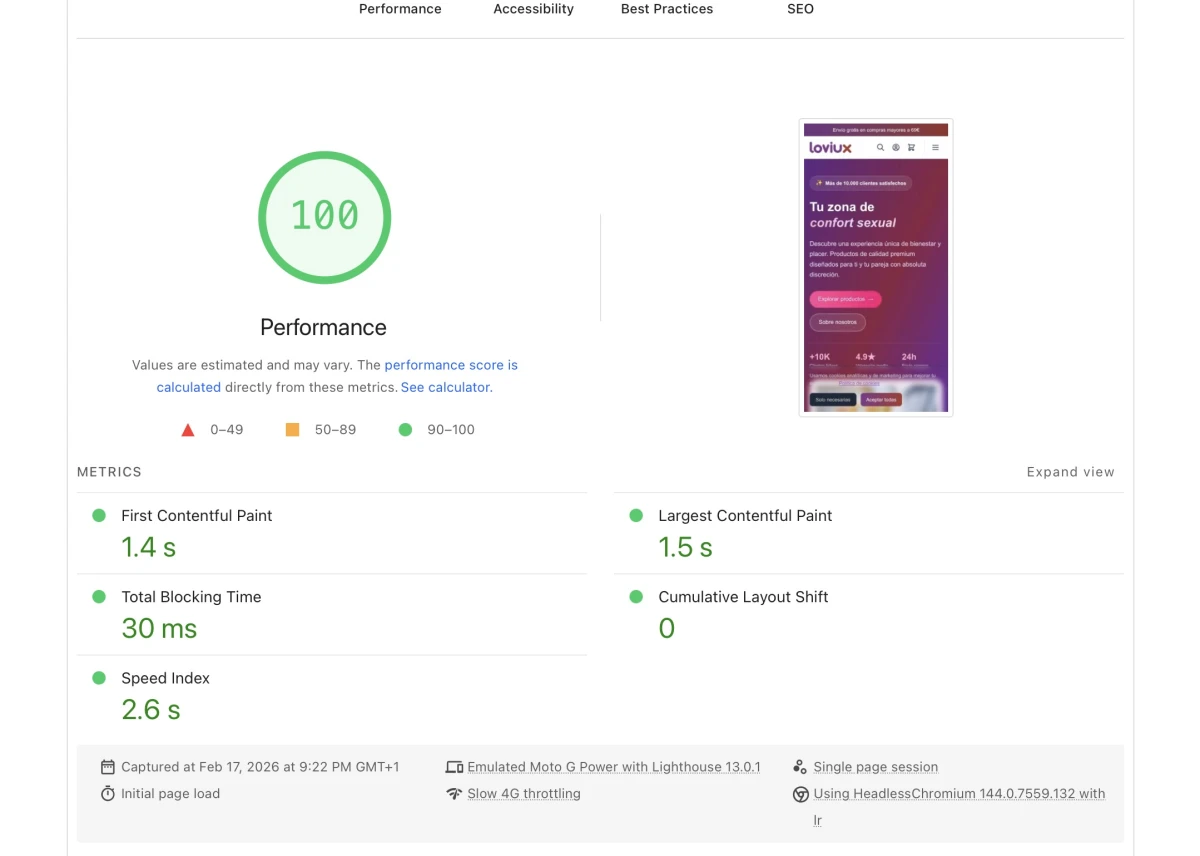
Performance in an ecommerce is not optional. A slow site loses sales. With 15 stores serving traffic from across Europe, the stack must be solid.
Cache Architecture
The Magento development setup we built for Loviux follows a 4-layer cache hierarchy:
- Varnish 7.x as reverse proxy: caches full pages. A Varnish hit serves a page in <10ms without touching PHP. We configured custom VCL for selective purging by store view, category, and product.
- Redis for application cache and sessions: eliminates disk I/O. Two separate instances — one for configuration/block cache (DB 0) and one for sessions (DB 2).
- PHP 8.4 OPcache: precompiles Magento's ~40,000 PHP files. With
opcache.jit=tracingenabled, hot-path functions compile to native machine code. - Magento's built-in full-page cache as a fallback for requests that bypass Varnish (logged-in users, non-empty carts).
Blocking CSS: A Counterintuitive Decision for CLS 0
Conventional wisdom says: load CSS asynchronously, extract critical CSS inline. We did the opposite. All CSS loads synchronously in the <head>.
Why? Because with Hyva + Tailwind, total CSS is ~35 KB (gzipped: ~8 KB). Loading it as render-blocking adds a few milliseconds to First Contentful Paint, but guarantees that the layout never shifts after the first render. The result: a CLS (Cumulative Layout Shift) of 0.000 consistently across every page.
In a project with dozens of different templates (home, category, product, checkout, CMS pages x 15 stores), maintaining a synchronised critical CSS system would be a maintenance nightmare. With 8 KB of blocking CSS, the trade-off is not worth the complexity.
Zero-Downtime Deploy With Symlink Switching
Production deployment follows a workflow that avoids any downtime:
- Build in a temporary directory (
/var/www/releases/YYYYMMDD-HHMMSS/). composer install --no-dev,bin/magento setup:di:compile,bin/magento setup:static-content:deployfor all 9 languages.- Cache warm-up: we fire requests at key pages to populate Varnish.
- Atomic symlink switch:
ln -sfnchanges the/var/www/currentsymlink to the new release. php-fpm reloadso workers pick up the new code.- Selective Varnish purge.
If anything fails, rollback is as simple as switching the symlink to the previous release. Downtime: 0 seconds.
The setup:static-content:deploy for 9 languages takes ~12 minutes. It is the slowest step in the pipeline, but since it runs before the switch, it has zero impact on live traffic.
Multi-Language Technical SEO
An ecommerce with 15 stores and 9 languages is a minefield for technical SEO. Google needs to understand which page targets which country and language, without confusing variants.
Hreflang on Every Page
Every page includes hreflang tags pointing to all its variants:
That is 14 hreflangs per page. With a catalogue of 60,000 products, we are talking about 168,000 hreflang declarations for product pages alone. We generate these dynamically with a module that queries Magento's URL rewrites per store view.
Complete Structured Data
We implemented Schema.org JSON-LD on every relevant page type:
- Product: with
offers,aggregateRating,brand,sku, andgtin13where available. Google surfaces rich snippets with price and availability. - CollectionPage: on category pages, with
numberOfItemsand breadcrumb context. - BreadcrumbList: full hierarchical navigation (Home > Category > Subcategory > Product).
- Organization: company data on the homepage and contact pages.
- FAQPage: on category pages that feature product-related frequently asked questions.
All validated with Google's Rich Results Test and error-free in Search Console.
Split Sitemaps Per Store
A single sitemap for 15 stores would exceed the 50,000 URL limit. We generate individual sitemaps per store view:
loviux.co.uk/sitemap.xmlis a sitemap index pointing tositemap-products.xml,sitemap-categories.xml, andsitemap-cms.xml.- The same pattern applies to every domain (.es, .fr, .de, .it, .nl, .pt, .pl, .co.uk, .at, .ch, .be, .com).
Each sitemap regenerates daily at 5:00 AM and includes <lastmod> values based on the actual last modification of the content, not the generation date. Google rewards honest timestamps.
Key Integrations
Brevo for Email Marketing
We connected Magento with Brevo (formerly Sendinblue) for transactional and marketing email automation:
- Bidirectional contact synchronisation (registration, purchase, abandonment).
- Transactional emails (order confirmation, shipping, invoicing) served from Brevo for better deliverability.
- Cart abandonment workflows segmented by store and language.
GA4 Enhanced Ecommerce
We implemented full GA4 Enhanced Ecommerce tracking with 10 standard events:
view_item, view_item_list, add_to_cart, remove_from_cart, view_cart, begin_checkout, add_shipping_info, add_payment_info, purchase, and refund.
Every event includes the store view dimension so that performance can be segmented by country and language in reports.
Cloudflare Turnstile
We replaced reCAPTCHA with Cloudflare Turnstile on every form: registration, login, contact, newsletter, and guest checkout. Turnstile shows no visible challenges to the user (it is invisible by default) and has a better acceptance rate than reCAPTCHA v3. In an ecommerce, every extra point of friction at checkout is a lost sale.
What We Took Away From This Project
After months of development, testing, and optimisation, these are the lessons that had the greatest impact:
- Hyva is no longer optional for new Magento 2 projects. If you start a project today on Luma, you are starting with technical debt. The performance gap is too wide to justify.
- Design your language fallback system before loading a single product. Doing it after 60,000 products are already in the system would have meant a painful data migration.
- Magewire is the right answer for Hyva checkout. Same paradigm as the rest of the frontend, no extra dependencies. Laravel Livewire proved the concept; Magewire brings it to Magento.
- AI content generation does not replace copywriters, but it scales where they cannot. 81,000 texts across 9 languages for EUR 420 is an equation that does not invite debate. The safety net is not upfront human review: it is multi-layer automated validation (banned phrases, character limits, structure and variants) plus regression detectors that surgically regenerate the affected products.
- Blocking CSS makes more sense than critical CSS with Hyva. When your total CSS weighs less than an avatar image, the complexity of maintaining a critical CSS pipeline is not worth it.
- Zero-downtime deployment is a requirement, not a nice-to-have. With 15 stores and 24/7 traffic spanning multiple time zones, there is no safe maintenance window.
Proof that the architecture works came after this article was published: opening a new market went from being a project to being a task of days. The latest additions, Norway and Italy, launched with the full catalog in their language, and the global store loviux.com serves as x-default for the rest of the world.
If your organisation needs to scale a Magento 2 ecommerce — whether it is a Hyva migration, a multi-store setup, or complex integrations — get in touch with our team. We have been building ecommerce solutions that work at real-world scale for over 15 years.