At Kiwop, we haven't written a single line of code by hand in months. Not one. Every function, every component, every database migration, every deploy script — everything is generated through artificial intelligence. And we're not talking about autocomplete or IDE suggestions: we're talking about an autonomous agent that writes, executes, debugs, and deploys code in real production.
The tool we currently use is Claude Code, Anthropic's CLI. But this article isn't about the tool itself — it's about what changes in a software development agency when the cost of generating code approaches zero. Because what changes isn't just speed: the role of the programmer changes, the quality of the final product changes, and what it means to develop software in 2026 changes fundamentally.
Why Nobody at Kiwop Writes Code by Hand Anymore
This is neither an exaggeration nor a marketing slogan. At Kiwop, for months now, no developer types code directly. Not frontend, not backend, not automation scripts, not database queries. Everything goes through Claude Code.
The reason isn't a technological whim. It's a strategic decision based on a simple observation: if AI can generate functional code in seconds, a developer's value no longer lies in typing. It lies in thinking. In designing architecture, defining workflows, anticipating edge cases, detecting security vulnerabilities, and ensuring the application works correctly across every possible scenario.
Previously, a developer spent 70–80% of their time writing code and 20–30% thinking about how it should work. Now that ratio has completely inverted. We spend most of our time designing, validating, and reviewing — and code generation happens almost instantly.
The result isn't necessarily a cheaper product. It's a vastly better product. More robust, with more edge cases covered, fewer vulnerabilities, and delivered in less time.
Architects and Bricklayers: The New Terminology of Development
At Kiwop, we like to use a metaphor that perfectly explains what has changed: our developers have stopped being bricklayers and have become architects.
A bricklayer executes. They lay bricks, follow blueprints, and work with their hands. It's valuable, essential work, but it's defined by mechanical execution. An architect, on the other hand, designs. They define the structure, choose the materials, anticipate structural problems, and make decisions that affect the integrity of the entire building.
In software development, Claude Code is the bricklayer. It writes the code, implements the functions, executes the commands, and deploys the changes. It's fast, tireless, and doesn't make syntax errors. But it doesn't know what to build or why. It doesn't understand the business context, it can't negotiate with a client, and it can't detect that an architectural decision made today will create a maintenance problem six months from now.
That's the architect's job. The senior developer who guides the AI with precise prompts, who knows what to ask, who detects when the generated code is syntactically correct but conceptually wrong. The AI is only as good as the person directing it. We've confirmed this time and time again.
How Our Workflow With Claude Code Works
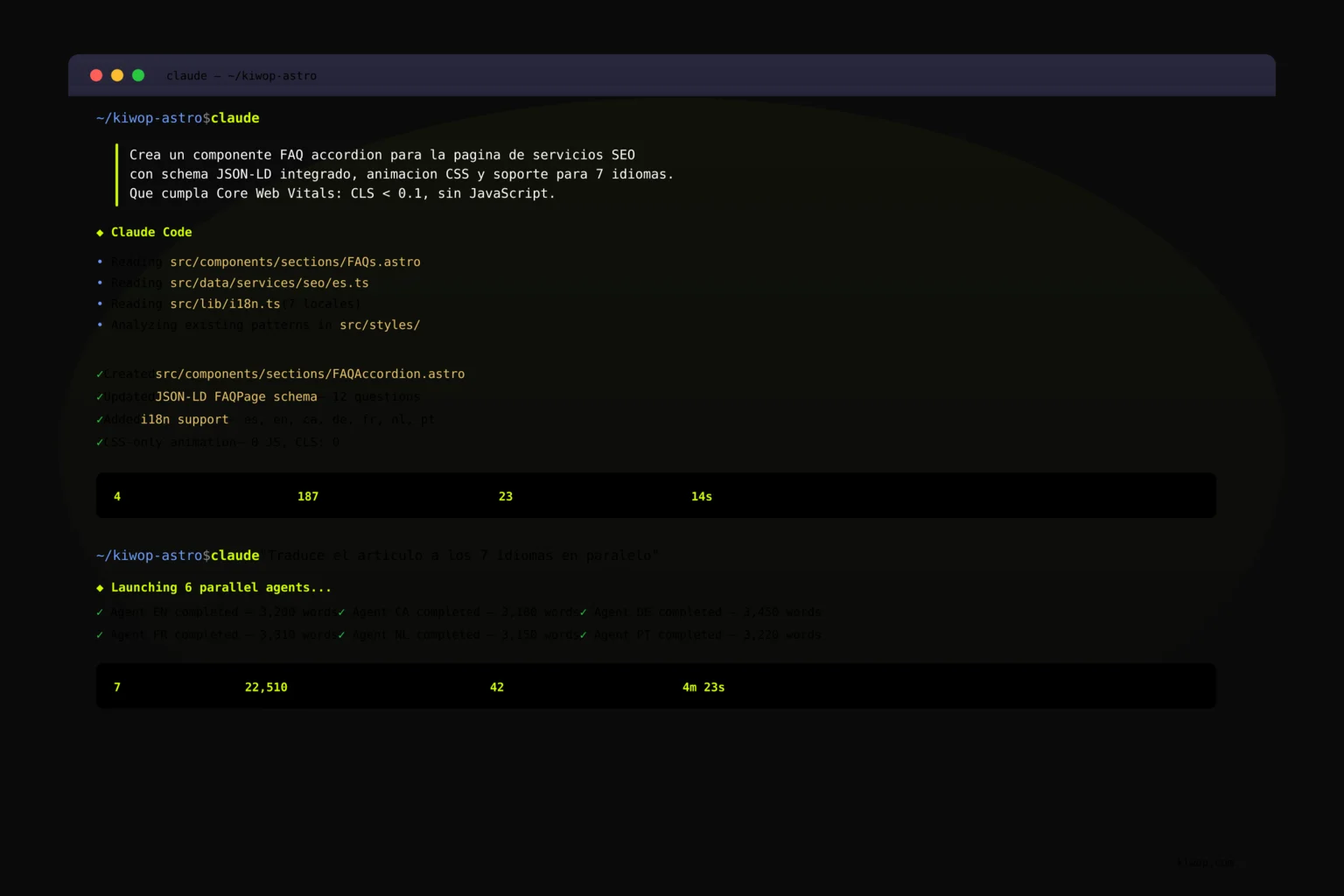
We don't use Claude Code as a chatbot you ask generic things of. We've integrated it as a central piece of our development stack, connected to real tools through MCP servers and configured with a CLAUDE.md file that acts as the project's memory and rules.
CLAUDE.md: The Team's Shared Brain
Every project at Kiwop has a CLAUDE.md file at the root of the repository. This file contains all the information that any developer (human or artificial) needs to work on the project: system architecture, code conventions, production URLs, database credentials, deploy commands, SEO rules, and security restrictions.
When Claude Code opens a project, the first thing it reads is this file. This way it understands the complete context without us having to repeat it in every session. It's like automatic onboarding that guarantees consistency, regardless of who launches the work session.
MCP Servers: Connection to Real Tools
Claude Code doesn't work in isolation. Through MCP (Model Context Protocol) servers, we connect it directly to the tools we use in production: Google Search Console for SEO data, the PostgreSQL database of our CMS, the Google Ads API, and more.
This allows Claude Code not only to generate code but to interact with real systems. It can query indexing metrics in Search Console, insert articles directly into the blog database, or analyze advertising campaign performance — all from the terminal, without leaving the workflow.
Multi-Agent Workflows for Complex Tasks
One of the most powerful capabilities is launching multiple agents in parallel. A real example: when we need to create a blog article in the 7 languages of our website (Spanish, English, Catalan, German, French, Dutch, and Portuguese), we launch simultaneous translation agents. Each one works independently, adapting the content to the target language with its own capitalization conventions, idiomatic expressions, and natural structure.
What previously required days of manual work — or a significant investment in translation services — now completes in minutes. And the result, supervised by a human, maintains the quality we demand.
Security and Controlled Deployment
A critical point: Claude Code never has direct access to the production deploy. In our CLAUDE.md, it's explicitly prohibited to run npm run build directly, because we're on a production server where a failed build could bring down the live site.
Instead, everything goes through a deploy script with automatic rollback that performs an atomic build, directory swap, zero-downtime reload, and cascading cache purge. The AI can suggest changes and execute code, but the deploy is a controlled process with multiple layers of security.
Why a Senior Developer Is Essential for Guiding AI
This is probably the most important lesson we've drawn after months of working with Claude Code: the quality of the result depends directly on the experience of the person guiding it.
You don't strictly need to be a programmer to use Claude Code. Anyone can write a prompt and get functional code. But the difference between functional code and well-designed code is enormous. A senior developer knows:
- What to ask. They don't just say "make me a contact form." They specify validation, input sanitization, error handling, rate limiting, CSRF protection, the user experience in case of failure, and the architecture of the API that will receive the data.
- When the generated code is bad. AI can produce code that works but is a structural disaster. A senior immediately detects when spaghetti code is being generated, when there's excessive coupling, when responsibilities are being duplicated, or when a premature abstraction will create maintenance problems.
- What not to ask for. Sometimes the best decision is not to generate new code. A senior knows when the right solution is to reuse an existing module, simplify a flow, or even remove unnecessary functionality. AI tends to generate more code than needed if it isn't guided with judgment.
We've seen the difference firsthand. The same project, guided by a junior profile versus a senior, produces radically different results. Not in speed — the AI is equally fast in both cases — but in architectural quality, maintainability, and robustness of the final result.
What We've Learned: Iterations, Mistakes, and Spaghetti Code
After months of using Claude Code in real production, it hasn't all been smooth sailing. These are the most relevant lessons we've accumulated.
The Key Is Iterating, Not the Perfect Prompt
One of the myths of AI coding is that there exists a "perfect prompt" that generates the exact code you need on the first try. It doesn't. The real process looks more like an iterative conversation:
- You start with a well-crafted initial prompt, with enough context about what you need.
- You review the result. It's almost never perfect on the first try.
- You correct, refine, and request specific adjustments.
- You review again.
- You repeat until the result meets your standards.
Iterations are the key. A good initial prompt reduces the number of cycles, but the idea that AI generates production-ready code in a single step is, in our experience, a fantasy. What does happen is that each iteration takes seconds instead of minutes, which enormously accelerates the complete cycle.
Vibe Coding Generates Spaghetti Code
The term "vibe coding" has become popular to describe a programming style where you simply tell the AI what you want without much technical specification and let it make the architectural decisions. At Kiwop, we've tried it and the result is consistent: it works for quick prototypes, but it produces code we don't want in production.
Without an architect's guidance, AI tends to:
- Create monolithic functions hundreds of lines long instead of modular code.
- Duplicate logic instead of abstracting it correctly.
- Add unnecessary dependencies to solve problems that can be resolved with native code.
- Ignore edge cases and error handling because nobody explicitly asked for them.
- Mix responsibilities: business logic with presentation logic, data access with validation.
That's why we insist so much on the role of the architect. Vibe coding has its place (we'll explore it in a future article), but for production software, expert technical supervision is not optional.
You Need to Learn to Read Code, Not Just Generate It
An interesting side effect of working with AI: our developers read far more code than they write. Reviewing what Claude Code generates, detecting subtle problems, understanding implicit decisions in the generated code — these critical reading skills have become more important than the ability to write code quickly.
It's a paradigm shift. Technical training remains essential, but the most valuable skill is no longer "writing clean code" but "detecting problematic code and knowing how to correct the direction."
The Cost of Generating Code Is Approaching Zero
This is the most profound implication of everything we're experiencing. If generating code costs practically nothing — neither in time nor in effort — value shifts completely to other activities:
Architecture design. We can spend hours thinking about how an application should work before generating a single line. What happens if the user does X? What about 10,000 simultaneous requests? What happens when the database grows to millions of records? Before, these questions were answered "on the fly" because there wasn't time. Now we answer them before we start.
Security. We can dedicate real time to reviewing for security vulnerabilities instead of trusting that "we'll review it later" (the "later" that in practice never came).
Testing and validation. We can generate exhaustive tests for each feature, cover more edge cases, and do real QA, not cosmetic QA.
Exploring alternatives. We can ask the AI to implement the same functionality in three different ways, compare the results, and choose the best one. Before, implementing an alternative was a luxury the budget didn't allow.
The net result: we don't make cheaper software. We make vastly better software for the same cost. More robust, with more scenarios covered, better documented, and delivered in less time. It's a radical improvement in the value proposition, not a price reduction.
What We Use Claude Code for at Kiwop
This isn't an experiment or a one-off use. Claude Code is integrated into every area of the agency's work.
On our own website. The site you're reading — built with Astro, with more than 1,500 pages indexed in 7 languages — is managed entirely with Claude Code. From creating blog articles in 7 languages simultaneously to configuring nginx redirects, auditing technical SEO, or optimizing Core Web Vitals. Everything goes through AI.
On client projects. Every software development project we do for clients — whether it's an ecommerce on Magento, an app in Laravel, a website on WordPress, or a custom solution — uses Claude Code as a development tool. Clients don't receive "AI-generated code": they receive software designed by software architects and implemented with the most efficient tools available.
On internal applications. Automation scripts, integrations with third-party APIs (Google Ads, Google Search Console, analytics services), audit tools, multilingual content pipelines — all our internal tooling is built and maintained with the help of Claude Code.
Complementary Tools in Our Stack
Claude Code doesn't work alone. We combine it with other tools that cover specific needs:
- Figma for interface design and visual prototyping. Design remains a human, creative process that AI complements but doesn't replace.
- Lovable for rapid prototypes and concept validation. When we need a first functional version to validate an idea with a client before investing in full development.
- Pencil for visual concept generation and design exploration.
- Google Search Console and Google Ads integrated via MCP servers so Claude Code can access real SEO and advertising data directly from the terminal.
The philosophy is pragmatic: we use the best tool for each task, without dogmatism.
It's Not Just Claude Code: Openness to New Tools
It's important to be honest: Claude Code is the tool we use today because it's, in our experience, the one that works best for our workflow right now. But the market for AI programming tools is evolving at unprecedented speed.
Codex from OpenAI, Antigravity, Cursor, GitHub Copilot, Windsurf — every month new options appear and existing ones improve substantially. At Kiwop, we maintain an attitude of total openness: we constantly evaluate new tools and are willing to switch if we find something that better fits our needs.
What doesn't change is the methodology. Regardless of the tool, the principles we've discovered that work remain the same: a senior architect guiding the AI, constant iterations, code reviewed by humans, non-negotiable security, and a controlled deploy process.
The tool is replaceable. The method is not.
Frequently Asked Questions
What Is Claude Code and How Does It Differ From Other Programming Assistants?
Claude Code is Anthropic's official command-line interface (CLI) for AI-assisted programming. Unlike IDE-integrated assistants like GitHub Copilot or Cursor, Claude Code works directly from the terminal and can execute commands, read and modify files, interact with databases, and connect to external services through MCP servers. This makes it an autonomous agent capable of completing complex tasks independently, not just suggesting code snippets within an editor.
Do You Need to Know How to Program to Use Claude Code?
It's not strictly necessary for basic tasks, but the quality of the result improves radically when the person guiding the AI has software development experience. A senior developer knows how to detect problematic code, request the right abstractions, and avoid the architectural errors AI makes when it doesn't receive precise technical direction. In our experience, the combination of an experienced senior with Claude Code produces results that neither the human nor the AI would achieve separately.
How Much Has Real Productivity Increased at Kiwop?
Productivity has multiplied significantly, although we prefer not to give exact figures because they vary greatly depending on the type of task. What we can say with certainty: tasks that previously required days (such as creating multilingual content for 7 locales, auditing hundreds of URLs, or configuring complex API integrations) now complete in hours or minutes. The most relevant impact isn't speed, but that we can dedicate the time saved to improving the quality of the final product.
Does Claude Code Replace Developers?
No. It changes their role. At Kiwop, we haven't reduced our team — we've transformed what each person does. Developers dedicate more time to architecture design, code review, security, and strategic decisions. Less time typing and more time thinking. The developer's value hasn't disappeared; it has shifted from mechanical execution to technical judgment and strategic direction.
Aren't You Afraid That AI Will Generate Insecure or Buggy Code?
It's a real risk that we manage with multiple layers of security. First, our CLAUDE.md file includes explicit security rules that the AI follows in every session. Second, all generated code goes through human review before reaching production. Third, we have a deploy process with automatic rollback that prevents an error from reaching the live server. And fourth, the AI never has direct access to the production deploy. Security is not something we delegate to AI: it's the human architect's responsibility.
What Happens if Claude Code Ceases to Exist or Changes Its Terms?
It's a legitimate question that we ask ourselves. That's why we maintain total openness to other tools on the market and ensure our methodology doesn't depend on a specific provider. The principles — architect guiding the AI, constant iteration, human review, controlled security — work with any AI coding tool. If tomorrow Codex, Cursor, or any other alternative offers better results, we migrate. The dependency is methodological, not technological.