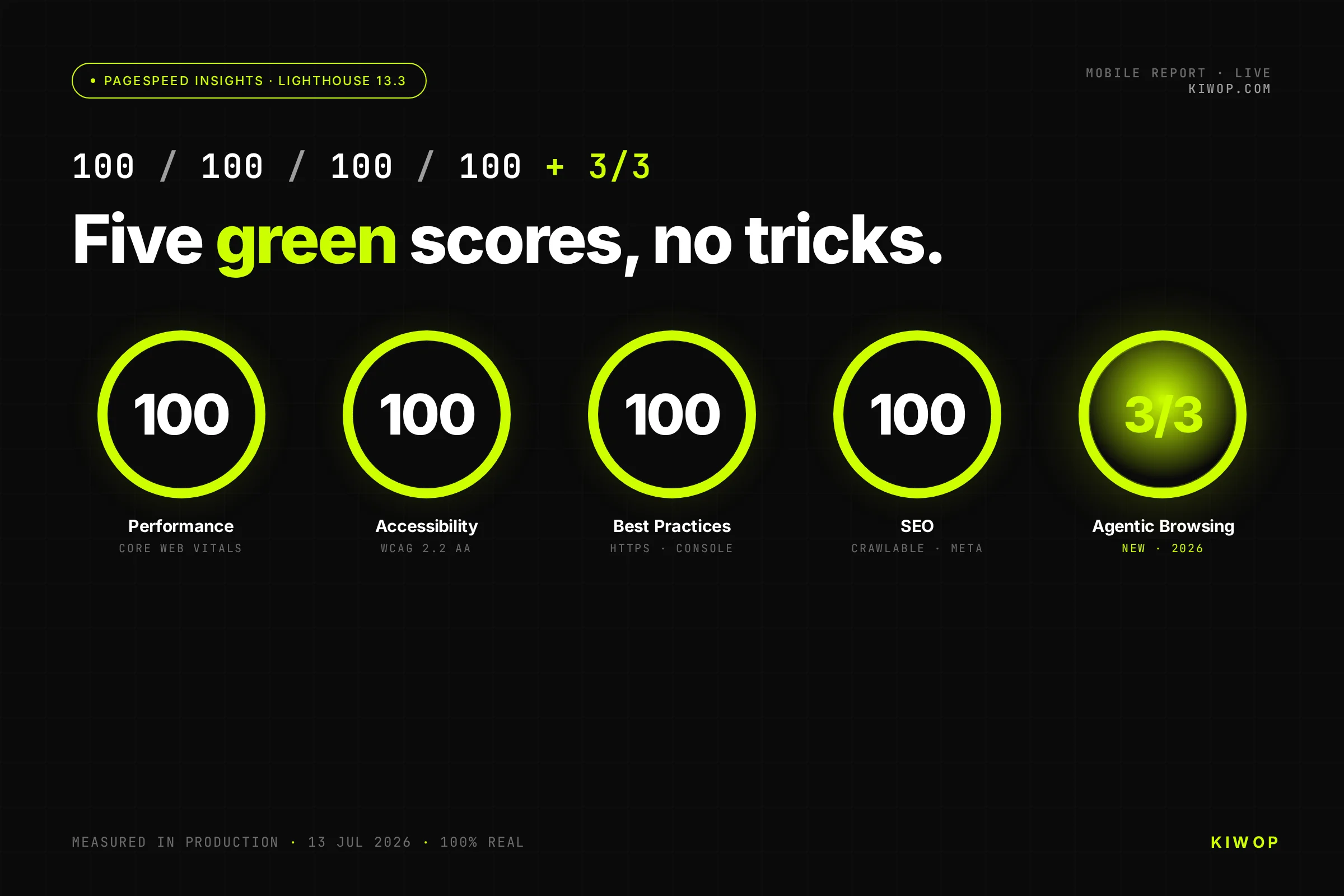
On July 13, 2026 we ran kiwop.com through PageSpeed Insights and the mobile report came back with five results: 100 in Performance, 100 in Accessibility, 100 in Best Practices, 100 in SEO and 3/3 on Agentic Browsing, the new category that measures whether AI agents can use a website. First Contentful Paint at 1.1 seconds, Total Blocking Time at 0 milliseconds and Cumulative Layout Shift at 0, emulating a mid-range phone on a slow 4G connection.
This is not a lucky screenshot or a page stripped down for the occasion: it is the real website that runs our business, and the result of architecture decisions any team can copy. This article walks through all of them. And since you should never trust screenshots, you can rerun the test right now while you read.
What the five numbers mean
The first four are the classic Lighthouse categories, Google's analysis engine. Performance measures the real loading experience (LCP, TBT, CLS); Accessibility, whether the site is operable by any person and assistive technology; Best Practices, technical and security hygiene; SEO, whether search engines can understand and index it.
The fifth is the 2026 newcomer. Agentic Browsing arrived with Lighthouse 13.3 in May and measures something different: whether an AI agent can read your website and operate it, for instance filling in a form or following a purchase flow. It reports a ratio of passed checks rather than a score out of 100, and Google marks it as experimental. Most websites do not pass it yet; if you want to know where yours stands, we built a free two-minute Agentic Browsing test.
The recipe: seven engineering decisions
1. The HTML arrives with the content inside
kiwop.com is served rendered from the server: the HTML the browser (or the crawler, or the agent) receives already contains all the content. No waiting for a JavaScript framework to paint the page on the client. This single decision supports Performance, SEO and half of Agentic Browsing at once.
The how: Astro renders on the server (Node 24 and PM2 in cluster) and ships the HTML already assembled. Neither the content nor the links depend on the browser running JavaScript, so a crawler or an agent with no JS engine reads the whole page just like you do.
2. The LCP element is text, visible from the first frame
The most common mistake we see in audits: a hero with a fade-in that delays exactly what Google measures. Our H1 is visible from the first frame, with no entrance animations and no waiting for the font (font-display prevents the typographic reflow). Result: Largest Contentful Paint at 1.7 seconds on an emulated phone with a slow connection.
The how: The H1 ships with its final colour from the first frame (no opacity 0 with a fade-in) and the font uses font-display optional so there is no reflow on load. The element Google measures as LCP is painted before the decorative CSS even arrives.
3. Total Blocking Time 0: JavaScript waits until you need it
The page runs barely any JavaScript at startup, and everything decorative (animations, counters, the generative hero background) activates only when the user interacts or the element enters the viewport. The main thread stays free: 0 milliseconds blocked.
The how: The JavaScript behind animations and counters does not run at startup: it wakes up with requestIdleCallback or when it enters the viewport. The main thread is free at the exact moment Lighthouse measures blocking, and Total Blocking Time stays at 0 ms.
4. CLS 0: nothing jumps
Every image and embed has explicit dimensions, anything injected has its space reserved, and fonts load without reflowing the text. A stable layout is no longer just visual comfort: with Agentic Browsing, a button that moves is an agent click that fails.
The how: Every image carries width and height in the HTML, fonts reserve their space and nothing is injected above already-painted content. The layout does not move a single pixel after the first render.
5. AVIF images negotiated at the server
The HTML references the classic image (.jpg) and the server delivers the AVIF version when the browser accepts it. Same URL, 60% to 80% less weight, zero changes in the page code.
The how: nginx keeps image.jpg.avif next to the original and, when the browser sends Accept image/avif, serves it instead with Vary Accept. The HTML never changes: the img src always points to the .jpg and the negotiation happens on the server. An AVIF weighs about half its JPEG equivalent.
6. Layered caching in front of rendering
Between the database and the visitor there are several cache layers (application, server render and CDN), each with its own invalidation policy. The practical effect: almost every visit receives pre-cooked HTML, milliseconds away from the user.
The how: Payload caches in memory, Redis stores the render with stale-while-revalidate, nginx caches the SSR HTML and Cloudflare serves it from the edge. The visitor almost never touches the database: they get bytes that were already prepared.
7. Accessibility treated as a machine interface
Labels on every field, real buttons, a heading hierarchy without gaps, landmarks and AA contrast. It is the right thing for people and, on top of that, it is the interface agents use: they navigate the accessibility tree, not the pixels. The 100 in Accessibility and the 3/3 on Agentic Browsing come from the same work.
The how: Native HTML before divs, a single h1 per page, a label on every field, visible focus and contrast of at least 4.5:1. The very thing that makes the page usable with a screen reader makes it readable for an agent: accessibility stopped being a cosmetic layer.
The new exam: how Agentic Browsing is passed
The category audits four fronts: agent-oriented accessibility (names, labels, tree integrity), layout stability, llms.txt presence and WebMCP integration, the proposed standard for declaring your website's actions as tools an agent can invoke.
In our case, the 3/3 corresponds to the three checks applicable to the page: agent accessibility, stability and llms.txt. WebMCP is still in origin trial (Chrome 150 or later) and is the natural next step for transactional websites: an agent should not have to guess where to click to buy from you.
The next step is already on the table: WebMCP. Instead of the agent guessing how to fill in a form by reading the DOM, the site offers it declared tools (search, book, buy) it can call directly. It is in origin trial, and kiwop.com is among the first getting ready for it. Agentic Browsing measures whether an agent can read and move around your site; WebMCP measures whether it can operate it.
How to measure it yourself
None of this is opinion: you can check it in two minutes, no sign-up.
- Open PageSpeed Insights, paste your URL and read the mobile report (it is stricter than desktop, and it is the one that counts).
- For Agentic Browsing you need Lighthouse 13.3 or newer: in Chrome, DevTools, Lighthouse, tick the Agentic Browsing category and run it.
- View the page source (Ctrl+U): if the main text is there without running JavaScript, an agent will read it too.
- Check your robots.txt and your llms.txt: make sure they do not block GPTBot, ClaudeBot or PerplexityBot.
If any of the four classic categories drops below 90, you know where to start; the seven decisions in the recipe tell you where to look.
What we did not do
- Serve a lightweight version just for the test: the report is from the real production site, with analytics, chat and forms running.
- Hide content from Lighthouse to inflate the score: that is called cloaking and sooner or later it costs you.
- Lazy-load the LCP element: it is the mistake we fix most often in audits, because it delays exactly what Google measures.
The checklist if you want to replicate it
- Main content visible without executing JavaScript (check your page source).
- robots.txt not blocking GPTBot, ClaudeBot or PerplexityBot.
- llms.txt published at the domain root.
- Schema.org structured data for the business (Organization, Service, Product, FAQPage).
- Clean heading hierarchy, landmarks and alt text on images.
- Labels on every form field and semantic buttons.
- Explicit dimensions on images and embeds: CLS below 0.1.
- No popups or overlays covering the content on arrival.
- LCP below 2.5 seconds on mobile.
- A conversion path with no forced sign-up and no CAPTCHA in the middle.
Frequently asked questions
Is scoring 100 on PageSpeed Insights actually worth it?
It is worth it as a signal, not as a goal. A 100 correlates with good Core Web Vitals, and those do influence ranking and conversion. But the score is a means: what matters is that the page loads fast for a real person and stays readable for a search engine or an agent. A 100 achieved with tricks that hurt the experience is worth nothing.
What is Agentic Browsing and how is it different from SEO?
It is the category Lighthouse added in May 2026 (version 13.3). It measures whether an AI agent (ChatGPT, Claude or Perplexity driving a browser) can understand and navigate your site: clear names and labels, content in the HTML, and robots and llms.txt that do not block it. Classic SEO optimises for crawling and ranking; Agentic Browsing optimises for an AI being able to act on your page, not just index it.
Do I need to rebuild my whole site to reach 100?
Almost never. Most sites lose points to four or five recurring causes: an LCP with a fade-in, heavy JavaScript at startup, images with no dimensions and no compression, and forms with no labels. You fix them one by one. Rebuilding only makes sense when the problem is structural, for example if all the content is painted with client-side JavaScript.
Can a WordPress site score 100?
It can get close, but it is harder. The stack of plugins and themes tends to drag along CSS and JavaScript you do not use, and that is where Performance and Total Blocking Time points go. You get a long way with caching, a lightweight theme and pruning what is unused; a clean, stable 100 usually calls for an architecture built for performance, like the one behind kiwop.com.
What does the 3/3 in Agentic Browsing mean?
That the page passes the three checks that apply to it in that category: agent-oriented accessibility, content integrity in the HTML and allowed access for crawlers. Not every audit applies the same checks; in our case the three relevant ones are green.
Will this still hold a year from now?
The fundamentals will: HTML with the content inside, little JavaScript, light images and real accessibility have been the base for years and will stay that way. What changes is the measuring surface: Agentic Browsing is from 2026 and WebMCP comes next. That is why we build on principles, not tricks: when the new metric lands, you already pass it.
Want these numbers on your website?
Start with the Agentic Browsing test: two minutes, no sign-up, and you leave with your concrete gap list. If you would rather have us measure it, the AI audit tells you what agents and models see on your website today and in what order to fix it, and with the GEO service we make sure AI cites you and its agents can operate on your site. No hype: the PageSpeed report on the table, before and after. And if you want your website to be the next one with these numbers, talk to an architect.